<?xml version="1.0" encoding="UTF-8"?><feed
  xmlns="http://www.w3.org/2005/Atom"
  xmlns:thr="http://purl.org/syndication/thread/1.0"
  xml:lang="en-US"
  xml:base="http://www.techeta.com/wp-atom.php"
   >
	<title type="text">techETA</title>
	<subtitle type="text"></subtitle>

	<updated>2012-11-15T21:15:45Z</updated>

	<link rel="alternate" type="text/html" href="http://www.techeta.com" />
	<id>http://www.techeta.com/feed/atom/</id>
	<link rel="self" type="application/atom+xml" href="http://www.techeta.com/feed/atom" />

	<generator uri="http://wordpress.org/" version="4.0">WordPress</generator>
	<entry>
		<author>
			<name>Rafael Hernandez</name>
						<uri>http://www.techeta.com</uri>
					</author>
		<title type="html"><![CDATA[Gigabyte GeForce GTX 680 4GB goes for the performance crown]]></title>
		<link rel="alternate" type="text/html" href="http://www.techeta.com/gigabyte-geforce-gtx-680-4gb-goes-for-the-performance-crown/" />
		<id>http://www.techeta.com/?p=17373</id>
		<updated>2012-11-15T21:15:45Z</updated>
		<published>2012-11-15T21:15:45Z</published>
		<category scheme="http://www.techeta.com" term="Graphics Cards" /><category scheme="http://www.techeta.com" term="Gigabyte" /><category scheme="http://www.techeta.com" term="Gigabyte GeForce GTX 680 4GB" /><category scheme="http://www.techeta.com" term="graphics card" /><category scheme="http://www.techeta.com" term="Nvidia" /><category scheme="http://www.techeta.com" term="NVIDIA GeForce GTX 680 4GB" /><category scheme="http://www.techeta.com" term="video card" />		<summary type="html"><![CDATA[It&#8217;s not often that you&#8217;ll find a reason to go with a peripheral that takes up so much space but you might make an exception in this case. The Gigabyte GeForce GTX 680 4GB video card packs in a trio of fans to keep the temperatures low and a triple slot design that enables it [&#8230;]]]></summary>
		<content type="html" xml:base="http://www.techeta.com/gigabyte-geforce-gtx-680-4gb-goes-for-the-performance-crown/"><![CDATA[<p><a class="post_image_link" href="http://www.techeta.com/gigabyte-geforce-gtx-680-4gb-goes-for-the-performance-crown/" title="Permanent link to Gigabyte GeForce GTX 680 4GB goes for the performance crown"><img class="post_image aligncenter" src="http://www.techeta.com/wp-content/uploads/2012/11/Gigabyte-GeForce-GTX-680-4GB-video-card-image.jpg" width="500" height="343" alt="Gigabyte GeForce GTX 680 video card image" /></a>
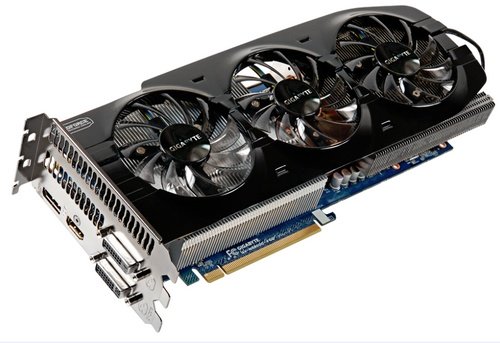
</p><p>It&#8217;s not often that you&#8217;ll find a reason to go with a peripheral that takes up so much space but you might make an exception in this case. The Gigabyte GeForce GTX 680 4GB video card packs in a trio of fans to keep the temperatures low and a triple slot design that enables it to get plenty of air flowing through its heatsink. While the extra cooling can do wonders they&#8217;ve clocked the GPU a bit up to a base of 1071MHz and its boost clocking to 1137Mhz giving it even more breathing room at those high resolution and high graphics settings that gamers demand while those 4GB of memory keeps its GPU fed with all sorts of wonderful gaming data. Just be sure your case is big enough to handle this monster.</p>
<p><a href="http://www.legionhardware.com/articles_pages/gigabyte_geforce_gtx_680_4gb,1.html">Gigabyte GeForce GTX 680 4GB</a> @ <em>Legion Hardware</em></p>
]]></content>
			<link rel="replies" type="text/html" href="http://www.techeta.com/gigabyte-geforce-gtx-680-4gb-goes-for-the-performance-crown/#comments" thr:count="0"/>
		<link rel="replies" type="application/atom+xml" href="http://www.techeta.com/gigabyte-geforce-gtx-680-4gb-goes-for-the-performance-crown/feed/atom/" thr:count="0"/>
		<thr:total>0</thr:total>
	</entry>
		<entry>
		<author>
			<name>Rafael Hernandez</name>
						<uri>http://www.techeta.com</uri>
					</author>
		<title type="html"><![CDATA[TuneUp Utilities 2013 Review]]></title>
		<link rel="alternate" type="text/html" href="http://www.techeta.com/tuneup-utilities-2013-review/" />
		<id>http://www.techeta.com/?p=17342</id>
		<updated>2012-11-15T20:55:42Z</updated>
		<published>2012-11-15T20:55:42Z</published>
		<category scheme="http://www.techeta.com" term="Reviews" /><category scheme="http://www.techeta.com" term="system maintenance" /><category scheme="http://www.techeta.com" term="TuneUp Utilities 2013" /><category scheme="http://www.techeta.com" term="TuneUp Utilities 2013 review" /><category scheme="http://www.techeta.com" term="Windows 8 tweaking software" /><category scheme="http://www.techeta.com" term="Windows performance" /><category scheme="http://www.techeta.com" term="Windows tweaking" />		<summary type="html"><![CDATA[Performing system maintenance and getting the best possible performance out of your machine is one of the more difficult and time consuming aspects of using a Microsoft Windows based computer. There are all manner of settings that can slow down your machine and applications that don&#8217;t behave very well which can degrade PC stability and [&#8230;]]]></summary>
		<content type="html" xml:base="http://www.techeta.com/tuneup-utilities-2013-review/"><![CDATA[<p><a class="post_image_link" href="http://www.techeta.com/tuneup-utilities-2013-review/" title="Permanent link to TuneUp Utilities 2013 Review"><img class="post_image aligncenter" src="http://www.techeta.com/wp-content/uploads/2012/11/TuneUp-Utilities-2013-Box-Image.png" width="500" height="300" alt="TuneUp Utilities 2013 Box" /></a>
</p><p>Performing system maintenance and getting the best possible performance out of your machine is one of the more difficult and time consuming aspects of using a Microsoft Windows based computer. There are all manner of settings that can slow down your machine and applications that don&#8217;t behave very well which can degrade PC stability and performance.</p>
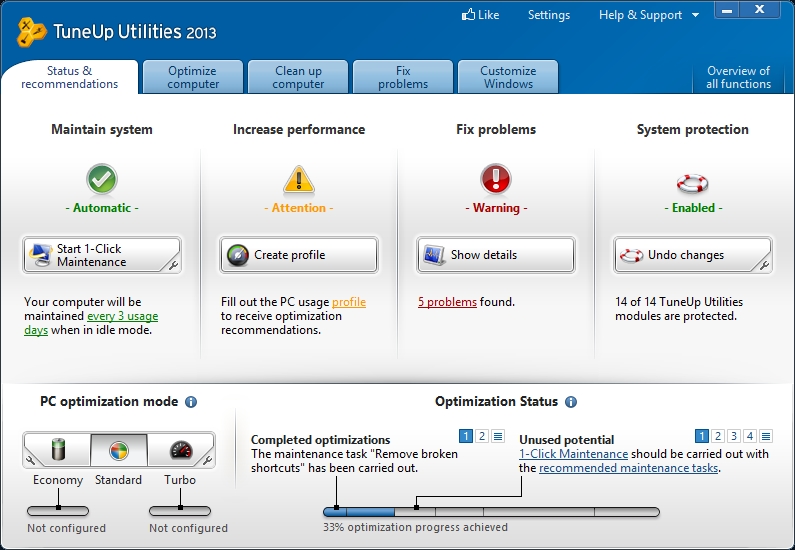
<p>TuneUp Utilities 2013 is a massive collection of programs designed to help you keep on top of of what&#8217;s going on with your PC and improve its performance in a number of interesting ways. It brings all of its features together with some very powerful automated tools that can keep things running smoothly without much, if any, interaction on your part. We&#8217;ll be taking a look at how the software can improve your PC using experience without forcing you to micromanage it yourself.</p>
<p><a href="http://www.techeta.com/wp-content/uploads/2012/11/TuneUp-Utilities-2013.jpg"><img class="aligncenter size-large wp-image-17352" title="TuneUp Utilities 2013" src="http://www.techeta.com/wp-content/uploads/2012/11/TuneUp-Utilities-2013-433x300.jpg" alt="" width="433" height="300" /></a></p>
<p><strong>Keeping Up Appearances</strong></p>
<p>The more you use a computer the more you rely on applications to help you in your day to day activities. Unfortunately, for all of us, that means we&#8217;re left to the whims of programs that might not play nicely with all of the other software on our machines. This is where TuneUp Utilities 2013 attempts to step in and keep things from getting out of control. The software builds on the success of their 2012 version, which was an already solid system maintenance utility, and brings along support for the new Microsoft Windows 8 operating system. If you happen to be running an older Windows version don&#8217;t worry the company also has extensive support for Windows 7, Vista, and XP packed in as well.</p>
<p>TuneUp Utilities 2013 has some tricks up its sleeve in the form of new applications such as a Disk Cleaner, Browser Cleaner, and Shortcut Cleaner which gets rid of the nasty buildup of long orphaned files and keeps your browser&#8217;s storage footprint in check. A major update sees its Live Optimization feature bumped up to version 2.0 which we&#8217;ll be taking a look at later on.</p>

<a href='http://www.techeta.com/tuneup-utilities-2013-review/tuneup-utilities-2013-economy-mode/'><img width="150" height="81" src="http://www.techeta.com/wp-content/uploads/2012/11/TuneUp-Utilities-2013-Economy-Mode-150x81.jpg" class="attachment-thumbnail" alt="TuneUp Utilities 2013 Economy Mode" /></a>
<a href='http://www.techeta.com/tuneup-utilities-2013-review/tuneup-utilities-2013-fix-problems/'><img width="150" height="103" src="http://www.techeta.com/wp-content/uploads/2012/11/TuneUp-Utilities-2013-Fix-Problems-150x103.jpg" class="attachment-thumbnail" alt="TuneUp Utilities 2013 Fix Problems" /></a>
<a href='http://www.techeta.com/tuneup-utilities-2013-review/tuneup-utilities-2013-windows-customization/'><img width="150" height="103" src="http://www.techeta.com/wp-content/uploads/2012/11/TuneUp-Utilities-2013-Windows-Customization-150x103.jpg" class="attachment-thumbnail" alt="TuneUp Utilities 2013 Windows Customization" /></a>
<a href='http://www.techeta.com/tuneup-utilities-2013-review/tuneup-utilities-2013-1-click-maintenance/'><img width="150" height="131" src="http://www.techeta.com/wp-content/uploads/2012/11/TuneUp-Utilities-2013-1-Click-Maintenance-150x131.jpg" class="attachment-thumbnail" alt="TuneUp Utilities 2013 1-Click Maintenance" /></a>
<a href='http://www.techeta.com/tuneup-utilities-2013-review/tuneup-utilities-2013-application-suite/'><img width="150" height="103" src="http://www.techeta.com/wp-content/uploads/2012/11/TuneUp-Utilities-2013-Application-Suite-150x103.jpg" class="attachment-thumbnail" alt="TuneUp Utilities 2013 Application Suite" /></a>
<a href='http://www.techeta.com/tuneup-utilities-2013-review/tuneup-utilities-2013-computer-cleanup/'><img width="150" height="103" src="http://www.techeta.com/wp-content/uploads/2012/11/TuneUp-Utilities-2013-Computer-Cleanup-150x103.jpg" class="attachment-thumbnail" alt="TuneUp Utilities 2013 Computer Cleanup" /></a>
<a href='http://www.techeta.com/tuneup-utilities-2013-review/tuneup-utilities-2013-computer-optimization/'><img width="150" height="103" src="http://www.techeta.com/wp-content/uploads/2012/11/TuneUp-Utilities-2013-Computer-Optimization-150x103.jpg" class="attachment-thumbnail" alt="TuneUp Utilities 2013 Computer Optimization" /></a>

<p>It&#8217;s difficult to approach a piece of software like this since it has a wide range of functions that touch on almost every part of your OS. So I&#8217;ll stick to a few of my favorites but, rest assured, there are dozens, if not hundreds, of ways for this software to handle common PC annoyances from cleaning up temporary files that applications toss on your machine to tweaking and managing Windows settings effectively.</p>
<p>Since the program offers so many methods to keep your system from being over run by rogue temporary files and registry entries the 1-Click Maintenance feature is likely to get some heavy use. With it you can cover the bulk of system maintenance issues that crop up in one fell swoop which can save you a bit of storage space and make things run smoothly. If you&#8217;re not the kind of person to click buttons you can set up Automatic Maintenance to perform the same clean up and defragmenting tasks at times you won&#8217;t be using your PC, which comes in quite handy.</p>
<p><strong>A friendlier tweaking experience</strong></p>
<p>It should be noted that the TuneUp Utilities 2013 goes to extreme lengths in being customizable so that it stays out of the portions of your system you don&#8217;t want it in. The vast majority of options they present you are safe to tweak and clean up but if you aren&#8217;t comfortable with defragmenting the registry or any other feature it offers you the option of disabling or ignoring areas of your OS.</p>
<p>Of course all of this system maintenance talk is nice and all but improving system performance and battery life is also a large part of the TuneUp Utilities 2013 draw. To that end they provide tools like the Program Deactivator which allows you to disable programs without having to uninstall them, freeing up resources for your OS and other programs to use. There&#8217;s also the Economy Mode option which guides you through switching off unnecessary Windows services that can lead to quite a bit more battery life on your laptop.</p>
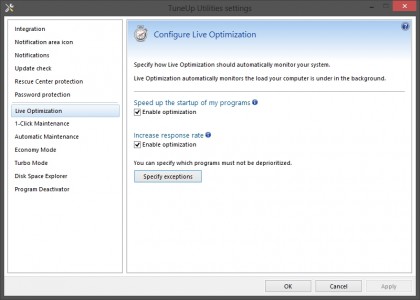
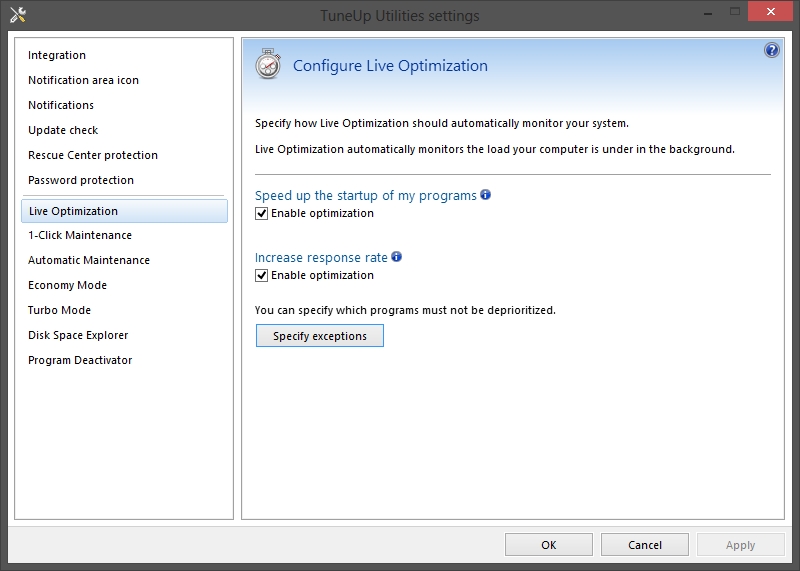
<p><a href="http://www.techeta.com/wp-content/uploads/2012/11/TuneUp-Utilities-2013-Live-Optimization.jpg"><img class="aligncenter size-large wp-image-17353" title="TuneUp Utilities 2013 Live Optimization" src="http://www.techeta.com/wp-content/uploads/2012/11/TuneUp-Utilities-2013-Live-Optimization-420x300.jpg" alt="" width="420" height="300" /></a></p>
<p>If one was forced to pin down one of the best features in the software&#8217;s bag of tricks it&#8217;s likely to be the Live Optimization option which has been upgraded to version 2.0. This particular utility monitors the system resource usage of applications you&#8217;re running then tailors your system&#8217;s response to it by lowering its priority automatically so your system doesn&#8217;t get bogged down by the program or elevates its resource usage temporarily to speed up those apps that can use a bit of a boost.</p>
<p>TuneUp Utilities 2013 is one of the best system maintenance and performance improvement programs available. Their extensive support for tweaking Windows settings, in every OS version going back to XP, and the lengths it goes to get the most out of your system means you won&#8217;t have much, if any, use for the glut of single use &#8220;tweaking&#8221; programs that are out there.</p>
<p>It&#8217;s hard to find any fault with the program. Its ease of use, well thought out help system, and tight integration enable you to know what the application is up to on your system which gives a higher level of confidence while using it not to mention the tweaking and performance improvements you&#8217;re likely to find, especially on machines that have a large number of applications and services running, makes TuneUp Utilities 2013 a great program and deserving of our Editor&#8217;s Choice Award.</p>
<p><a href="http://www.techeta.com/wp-content/uploads/2009/12/techETA-Editors-Choice.png"><img class="aligncenter size-full wp-image-12627" title="techETA Editor's Choice" src="http://www.techeta.com/wp-content/uploads/2009/12/techETA-Editors-Choice.png" alt="" width="150" height="150" /></a></p>
<p><em>Software provided by <a href="http://www.tune-up.com/">TuneUp Corporation</a></em></p>
]]></content>
			<link rel="replies" type="text/html" href="http://www.techeta.com/tuneup-utilities-2013-review/#comments" thr:count="0"/>
		<link rel="replies" type="application/atom+xml" href="http://www.techeta.com/tuneup-utilities-2013-review/feed/atom/" thr:count="0"/>
		<thr:total>0</thr:total>
	</entry>
		<entry>
		<author>
			<name>Rafael Hernandez</name>
						<uri>http://www.techeta.com</uri>
					</author>
		<title type="html"><![CDATA[XFX Double D Black Edition HD 7850, 7870 are prepped for action]]></title>
		<link rel="alternate" type="text/html" href="http://www.techeta.com/xfx-double-d-black-edition-hd-7850-7870-are-prepped-for-action/" />
		<id>http://www.techeta.com/?p=17334</id>
		<updated>2012-05-24T11:55:59Z</updated>
		<published>2012-05-24T13:30:54Z</published>
		<category scheme="http://www.techeta.com" term="Graphics Cards" /><category scheme="http://www.techeta.com" term="graphics card" /><category scheme="http://www.techeta.com" term="Radeon HD 7850" /><category scheme="http://www.techeta.com" term="Radeon HD 7870" /><category scheme="http://www.techeta.com" term="video card" /><category scheme="http://www.techeta.com" term="XFX" /><category scheme="http://www.techeta.com" term="XFX Double D Black Edition HD 7850" /><category scheme="http://www.techeta.com" term="XFX Double D Black Edition HD 7870" />		<summary type="html"><![CDATA[XFX&#8217;s Double D Black Edition Radeon HD 7850 and 7870 video cards want you to know that the D stands for Dissipation which they brought about by cramming in two fans on two of their mid range graphics cards in the hopes of keeping things cool while you&#8217;re in the most intense of gaming sessions. [&#8230;]]]></summary>
		<content type="html" xml:base="http://www.techeta.com/xfx-double-d-black-edition-hd-7850-7870-are-prepped-for-action/"><![CDATA[<p><a class="post_image_link" href="http://www.techeta.com/xfx-double-d-black-edition-hd-7850-7870-are-prepped-for-action/" title="Permanent link to XFX Double D Black Edition HD 7850, 7870 are prepped for action"><img class="post_image aligncenter" src="http://www.techeta.com/wp-content/uploads/2012/05/XFX-Double-D-Black-Edition-Radeon-HD-7870-video-card-image.jpg" width="500" height="244" alt="XFX Double D Black Edition Radeon HD 7870 video card image" /></a>
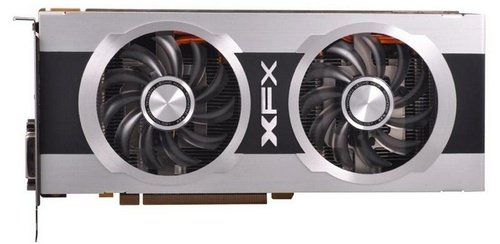
</p><p>XFX&#8217;s Double D Black Edition Radeon HD 7850 and 7870 video cards want you to know that the D stands for Dissipation which they brought about by cramming in two fans on two of their mid range graphics cards in the hopes of keeping things cool while you&#8217;re in the most intense of gaming sessions. The whole arrangement is a little over the top but the cards do come overclocked from the factory so there is a need for some additional cooling over what the reference coolers provide and it allows for you to experiment with even higher clock rates, should the need arise, without having to worry about the sort of heat load you&#8217;re putting your video card through.</p>
<p><a href="http://www.pcper.com/reviews/Graphics-Cards/XFX-Double-D-Black-Edition-HD-7850-and-HD-7870-Review-Kings-Midrange">XFX Double D Black Edition HD 7850 and HD 7870 Review</a> @ <em>PC Perspective</em></p>
]]></content>
			<link rel="replies" type="text/html" href="http://www.techeta.com/xfx-double-d-black-edition-hd-7850-7870-are-prepped-for-action/#comments" thr:count="0"/>
		<link rel="replies" type="application/atom+xml" href="http://www.techeta.com/xfx-double-d-black-edition-hd-7850-7870-are-prepped-for-action/feed/atom/" thr:count="0"/>
		<thr:total>0</thr:total>
	</entry>
		<entry>
		<author>
			<name>Rafael Hernandez</name>
						<uri>http://www.techeta.com</uri>
					</author>
		<title type="html"><![CDATA[Lepa G1600-MA 1600watt PSU handles your system load]]></title>
		<link rel="alternate" type="text/html" href="http://www.techeta.com/lepa-g1600-ma-1600watt-psu-handles-your-system-load/" />
		<id>http://www.techeta.com/?p=17330</id>
		<updated>2012-05-24T11:39:34Z</updated>
		<published>2012-05-24T11:39:34Z</published>
		<category scheme="http://www.techeta.com" term="Power Supplies" /><category scheme="http://www.techeta.com" term="Lepa" /><category scheme="http://www.techeta.com" term="Lepa G1600-MA" /><category scheme="http://www.techeta.com" term="PC power supply" /><category scheme="http://www.techeta.com" term="power supply" /><category scheme="http://www.techeta.com" term="PSU" />		<summary type="html"><![CDATA[The Lepa G1600-MA 1600watt power supply proves you can never have too much of a good thing. It&#8217;s a highly capable PSU designed to provide all manner of efficient energy to your system thanks to its 80 PLUS certification and offers up a healthy number of power plugs thanks to its modular cabling system. If you&#8217;re [&#8230;]]]></summary>
		<content type="html" xml:base="http://www.techeta.com/lepa-g1600-ma-1600watt-psu-handles-your-system-load/"><![CDATA[<p><a class="post_image_link" href="http://www.techeta.com/lepa-g1600-ma-1600watt-psu-handles-your-system-load/" title="Permanent link to Lepa G1600-MA 1600watt PSU handles your system load"><img class="post_image aligncenter" src="http://www.techeta.com/wp-content/uploads/2012/05/Lepa-G1600-MA-1600watt-PSU-PC-power-supply-image.jpg" width="500" height="350" alt="Lepa G1600-MA 1600watt PSU PC power supply image" /></a>
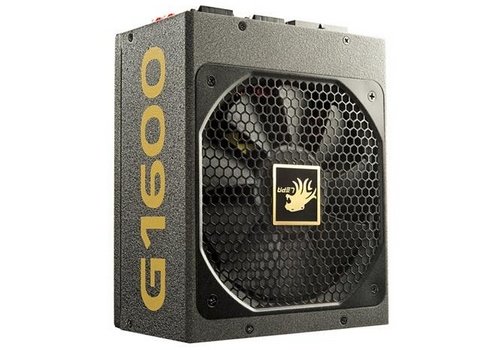
</p><p>The Lepa G1600-MA 1600watt power supply proves you can never have too much of a good thing. It&#8217;s a highly capable PSU designed to provide all manner of efficient energy to your system thanks to its 80 PLUS certification and offers up a healthy number of power plugs thanks to its modular cabling system. If you&#8217;re the sort of person that loads up their PC with quite a few video cards for all out gaming performance you&#8217;ll be happy to know that there&#8217;s plenty of cables available to keep your rig happy and healthy while it digs into the 1.6kW of energy the G1600-MA is pumping out.</p>
<p><a href="http://www.tweaktown.com/reviews/4704/lepa_g1600_ma_1600_watt_power_supply_review/index.html">Lepa G1600-MA 1600-watt Power Supply Review</a> @ <em>TweakTown</em></p>
]]></content>
			<link rel="replies" type="text/html" href="http://www.techeta.com/lepa-g1600-ma-1600watt-psu-handles-your-system-load/#comments" thr:count="0"/>
		<link rel="replies" type="application/atom+xml" href="http://www.techeta.com/lepa-g1600-ma-1600watt-psu-handles-your-system-load/feed/atom/" thr:count="0"/>
		<thr:total>0</thr:total>
	</entry>
		<entry>
		<author>
			<name>Rafael Hernandez</name>
						<uri>http://www.techeta.com</uri>
					</author>
		<title type="html"><![CDATA[Thermaltake Water 2.0 quells your system&#8217;s thirst]]></title>
		<link rel="alternate" type="text/html" href="http://www.techeta.com/thermaltake-water-2-0-cpu-cooler/" />
		<id>http://www.techeta.com/?p=17325</id>
		<updated>2012-05-22T10:07:04Z</updated>
		<published>2012-05-22T10:07:04Z</published>
		<category scheme="http://www.techeta.com" term="Heatsinks &amp; Coolers" /><category scheme="http://www.techeta.com" term="CPU cooler" /><category scheme="http://www.techeta.com" term="processor cooler" /><category scheme="http://www.techeta.com" term="Thermaltake" /><category scheme="http://www.techeta.com" term="Thermaltake Water 2.0 Pro Liquid Cooling" /><category scheme="http://www.techeta.com" term="water cooling" />		<summary type="html"><![CDATA[Thermaltake&#8217;s Water 2.0 Pro Liquid Cooling System might be familiar to anyone that has researched CPU coolers but its all enclose water cooling loop offers a compelling reason to purchase one over all of the other choices on the market: it actually comes with a second fan. A second fan on a water cooling setup [&#8230;]]]></summary>
		<content type="html" xml:base="http://www.techeta.com/thermaltake-water-2-0-cpu-cooler/"><![CDATA[<p><a class="post_image_link" href="http://www.techeta.com/thermaltake-water-2-0-cpu-cooler/" title="Permanent link to Thermaltake Water 2.0 quells your system&#8217;s thirst"><img class="post_image aligncenter" src="http://www.techeta.com/wp-content/uploads/2012/05/Thermaltake-Water-2.0-Pro-Liquid-Cooling-CPU-cooler-image.jpg" width="500" height="350" alt="Thermaltake Water 2.0 Pro Liquid Cooling CPU cooler image" /></a>
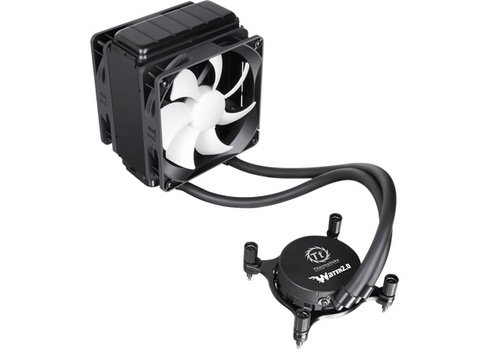
</p><p>Thermaltake&#8217;s Water 2.0 Pro Liquid Cooling System might be familiar to anyone that has researched CPU coolers but its all enclose water cooling loop offers a compelling reason to purchase one over all of the other choices on the market: it actually comes with a second fan. A second fan on a water cooling setup has been proven to lower operating temperatures for your processor at a small cost of some additional noise but there&#8217;s no better peace of mind knowing that your massive overclock is being properly cooled by a pair of hard working fans. It also puts up some very impressive numbers with a single fan should you be inclined to go that route.</p>
<p><a href="http://pro-clockers.com/cooling/2286-thermaltake-water-20-pro-liquid-cooling-system.html">Thermaltake Water 2.0 Pro Liquid Cooling System</a> @ <em>ProClockers</em></p>
]]></content>
			<link rel="replies" type="text/html" href="http://www.techeta.com/thermaltake-water-2-0-cpu-cooler/#comments" thr:count="0"/>
		<link rel="replies" type="application/atom+xml" href="http://www.techeta.com/thermaltake-water-2-0-cpu-cooler/feed/atom/" thr:count="0"/>
		<thr:total>0</thr:total>
	</entry>
		<entry>
		<author>
			<name>Rafael Hernandez</name>
						<uri>http://www.techeta.com</uri>
					</author>
		<title type="html"><![CDATA[Antec Gaming Series ONE PC Case keeps cash in your pocket]]></title>
		<link rel="alternate" type="text/html" href="http://www.techeta.com/antec-game-one-budget-pc-computer-case/" />
		<id>http://www.techeta.com/?p=17318</id>
		<updated>2012-05-16T03:11:41Z</updated>
		<published>2012-05-16T03:11:41Z</published>
		<category scheme="http://www.techeta.com" term="Computer Cases" /><category scheme="http://www.techeta.com" term="Antec" /><category scheme="http://www.techeta.com" term="Antec Gaming Series ONE" /><category scheme="http://www.techeta.com" term="budget case" /><category scheme="http://www.techeta.com" term="computer case" /><category scheme="http://www.techeta.com" term="gaming case" /><category scheme="http://www.techeta.com" term="PC Case" />		<summary type="html"><![CDATA[Antec&#8217;s Gaming Series ONE proves you don&#8217;t have to bust your budget on an enclosure for your next gaming rig. The mid tower ATX case sports an all black painted interior and comes loaded with two 120mm fans which is fine for the majority of builds but if you&#8217;re one to go all out with [&#8230;]]]></summary>
		<content type="html" xml:base="http://www.techeta.com/antec-game-one-budget-pc-computer-case/"><![CDATA[<p><a class="post_image_link" href="http://www.techeta.com/antec-game-one-budget-pc-computer-case/" title="Permanent link to Antec Gaming Series ONE PC Case keeps cash in your pocket"><img class="post_image aligncenter" src="http://www.techeta.com/wp-content/uploads/2012/05/Antec-Gaming-Series-ONE-PC-computer-Case-image.jpg" width="500" height="350" alt="Antec Gaming Series ONE PC computer Case image" /></a>
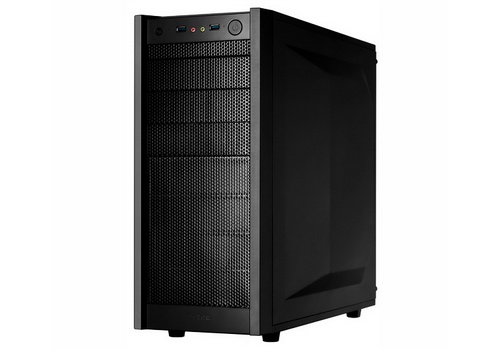
</p><p>Antec&#8217;s Gaming Series ONE proves you don&#8217;t have to bust your budget on an enclosure for your next gaming rig. The mid tower ATX case sports an all black painted interior and comes loaded with two 120mm fans which is fine for the majority of builds but if you&#8217;re one to go all out with your computers you&#8217;ll be happy to know that there&#8217;s an extra large CPU cutout so you can swap coolers ever so easily and generous cable routing cutouts so you can keep the internals nice and clutter free so that your airflow is unimpeded. It&#8217;s a solid design which will handle most of the build lists that are on a budget.</p>
<p><a href="http://www.nikktech.com/main/articles/pc-hardware/274-antec-game-one-midi-tower">Antec GAME ONE Midi Tower</a> @ <em>NikkTech</em></p>
]]></content>
			<link rel="replies" type="text/html" href="http://www.techeta.com/antec-game-one-budget-pc-computer-case/#comments" thr:count="0"/>
		<link rel="replies" type="application/atom+xml" href="http://www.techeta.com/antec-game-one-budget-pc-computer-case/feed/atom/" thr:count="0"/>
		<thr:total>0</thr:total>
	</entry>
		<entry>
		<author>
			<name>Rafael Hernandez</name>
						<uri>http://www.techeta.com</uri>
					</author>
		<title type="html"><![CDATA[AMD &#8220;Trinity&#8221; A10-4600M Mobile CPU with modest performance]]></title>
		<link rel="alternate" type="text/html" href="http://www.techeta.com/amd-a10-4600m-trinity-laptop-mobile-cpu/" />
		<id>http://www.techeta.com/?p=17313</id>
		<updated>2012-05-16T02:13:59Z</updated>
		<published>2012-05-16T02:13:59Z</published>
		<category scheme="http://www.techeta.com" term="Processors" /><category scheme="http://www.techeta.com" term="AMD A10-4600M" /><category scheme="http://www.techeta.com" term="cpu" /><category scheme="http://www.techeta.com" term="mobile CPU" /><category scheme="http://www.techeta.com" term="processor" /><category scheme="http://www.techeta.com" term="Trinity CPU" />		<summary type="html"><![CDATA[AMD&#8217;s Trinity processor is the successor to the company&#8217;s well received &#8220;Llano&#8221; processor which combined a CPU and graphics chip in the same die which allows for some interesting possibilities. Their new A10-4600M CPU sports computing cores inspired by the higher end Bulldozer processor giving it a nice performance boost over the older chip while the [&#8230;]]]></summary>
		<content type="html" xml:base="http://www.techeta.com/amd-a10-4600m-trinity-laptop-mobile-cpu/"><![CDATA[<p><a class="post_image_link" href="http://www.techeta.com/amd-a10-4600m-trinity-laptop-mobile-cpu/" title="Permanent link to AMD &#8220;Trinity&#8221; A10-4600M Mobile CPU with modest performance"><img class="post_image aligncenter" src="http://www.techeta.com/wp-content/uploads/2012/05/AMD-A10-4600M-Trinity-mobile-laptop-CPU-processor-image.jpg" width="500" height="369" alt="AMD A10-4600M Trinity mobile laptop CPU processor image" /></a>
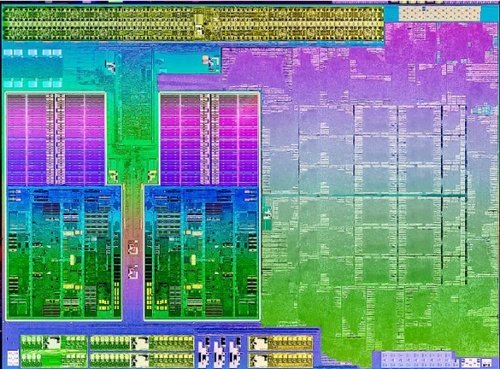
</p><p>AMD&#8217;s Trinity processor is the successor to the company&#8217;s well received &#8220;Llano&#8221; processor which combined a CPU and graphics chip in the same die which allows for some interesting possibilities. Their new A10-4600M CPU sports computing cores inspired by the <a href="http://www.techeta.com/amd-bulldozer-fx-8150-finally-makes-an-appearance/">higher end Bulldozer processor</a> giving it a nice performance boost over the older chip while the new integrated GPU is based on their latest 7000 series of graphics cores so you can expect improved frame rates as well. The chip isn&#8217;t going to win any awards for in general application speeds when compared to the competition but when it comes to gaming it can more than hold its own which is especially impressive since it&#8217;s a mobile chip destined for lower priced laptops.</p>
<p><a href="http://www.pcper.com/reviews/Mobile/AMD-A10-4600M-Trinity-Mobile-Review-Trying-Cut-Ivy">AMD A10-4600M Trinity For Mobile Review: Trying To Cut The Ivy</a> @ <em>PC Perspective</em></p>
]]></content>
			<link rel="replies" type="text/html" href="http://www.techeta.com/amd-a10-4600m-trinity-laptop-mobile-cpu/#comments" thr:count="0"/>
		<link rel="replies" type="application/atom+xml" href="http://www.techeta.com/amd-a10-4600m-trinity-laptop-mobile-cpu/feed/atom/" thr:count="0"/>
		<thr:total>0</thr:total>
	</entry>
		<entry>
		<author>
			<name>Rafael Hernandez</name>
						<uri>http://www.techeta.com</uri>
					</author>
		<title type="html"><![CDATA[Microsoft Windows 8 chkdsk gets reigned in]]></title>
		<link rel="alternate" type="text/html" href="http://www.techeta.com/windows-8-chkdsk-ntfs-improvements/" />
		<id>http://www.techeta.com/?p=17309</id>
		<updated>2012-05-11T09:41:10Z</updated>
		<published>2012-05-11T13:00:01Z</published>
		<category scheme="http://www.techeta.com" term="Software" /><category scheme="http://www.techeta.com" term="chkdsk" /><category scheme="http://www.techeta.com" term="Microsoft" /><category scheme="http://www.techeta.com" term="Microsoft Windows 8" /><category scheme="http://www.techeta.com" term="NTFS" /><category scheme="http://www.techeta.com" term="Windows 8" />		<summary type="html"><![CDATA[Microsoft has been doing quite a bit to improve some of the more obnoxious portions of an operating system as they work on Windows 8 and it would seem that they&#8217;ve fixated their gaze on little old chkdsk. Users rarely run into situations that require chkdsk&#8217;s intervention but when they do they&#8217;re in for quite [&#8230;]]]></summary>
		<content type="html" xml:base="http://www.techeta.com/windows-8-chkdsk-ntfs-improvements/"><![CDATA[<p><a class="post_image_link" href="http://www.techeta.com/windows-8-chkdsk-ntfs-improvements/" title="Permanent link to Microsoft Windows 8 chkdsk gets reigned in"><img class="post_image aligncenter" src="http://www.techeta.com/wp-content/uploads/2012/05/Microsoft-Windows-8-chkdsk-improvements-image.jpg" width="500" height="238" alt="Microsoft Windows 8 chkdsk improvements image" /></a>
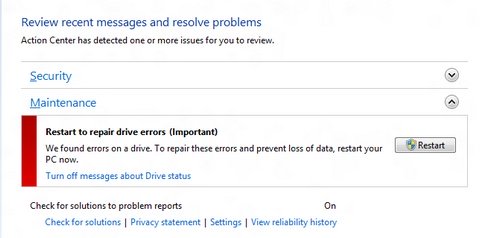
</p><p>Microsoft has been doing quite a bit to improve some of the more obnoxious portions of an operating system as they work on Windows 8 and it would seem that they&#8217;ve fixated their gaze on little old chkdsk. Users rarely run into situations that require chkdsk&#8217;s intervention but when they do they&#8217;re in for quite the lengthy wait as it looks over your hard drive for faults. It wasn&#8217;t a huge issue when hard drives had small capacities but with larger drives on the market you can imagine that you won&#8217;t have access to your PC any time soon. The updates they&#8217;re implementing seem to allow for better detection of issues while you&#8217;re using your PC so you don&#8217;t have to run pesky scans manually and it only requires a reboot to fix issues it has found on the OS drive. The fewer the annoyances the better.</p>
<p><a href="http://blogs.msdn.com/b/b8/archive/2012/05/09/redesigning-chkdsk-and-the-new-ntfs-health-model.aspx">Redesigning chkdsk and the new NTFS health model</a> @ <em>Building Windows 8</em></p>
]]></content>
			<link rel="replies" type="text/html" href="http://www.techeta.com/windows-8-chkdsk-ntfs-improvements/#comments" thr:count="0"/>
		<link rel="replies" type="application/atom+xml" href="http://www.techeta.com/windows-8-chkdsk-ntfs-improvements/feed/atom/" thr:count="0"/>
		<thr:total>0</thr:total>
	</entry>
		<entry>
		<author>
			<name>Rafael Hernandez</name>
						<uri>http://www.techeta.com</uri>
					</author>
		<title type="html"><![CDATA[Xigmatek Centauro 1000watt PSU provides beefy amounts of power]]></title>
		<link rel="alternate" type="text/html" href="http://www.techeta.com/xigmatek-centauro-1kw-power-supply/" />
		<id>http://www.techeta.com/?p=17301</id>
		<updated>2012-05-11T08:25:52Z</updated>
		<published>2012-05-11T11:00:59Z</published>
		<category scheme="http://www.techeta.com" term="Power Supplies" /><category scheme="http://www.techeta.com" term="1kW PSU" /><category scheme="http://www.techeta.com" term="80 PLUS Power Supply" /><category scheme="http://www.techeta.com" term="80 PLUS PSU" /><category scheme="http://www.techeta.com" term="power supply" /><category scheme="http://www.techeta.com" term="PSU" /><category scheme="http://www.techeta.com" term="Xigmatek" /><category scheme="http://www.techeta.com" term="Xigmatek Centauro 1000watt" />		<summary type="html"><![CDATA[Xigmatek&#8217;s Centauro 1000watt power supply isn&#8217;t big on fancy details; instead it approaches the challenges of providing a steady and efficient supply of power to your PC like a workhorse. Aside from its all black casing and massive fan to cool the PSU&#8217;s innards you&#8217;ll manage your system&#8217;s cabling quite nicely due to its modular [&#8230;]]]></summary>
		<content type="html" xml:base="http://www.techeta.com/xigmatek-centauro-1kw-power-supply/"><![CDATA[<p><a class="post_image_link" href="http://www.techeta.com/xigmatek-centauro-1kw-power-supply/" title="Permanent link to Xigmatek Centauro 1000watt PSU provides beefy amounts of power"><img class="post_image aligncenter" src="http://www.techeta.com/wp-content/uploads/2012/05/Xigmatek-Centauro-1000watt-PSU-power-supply-80-PLUS.jpg" width="500" height="350" alt="Xigmatek Centauro 1000watt PSU power supply 80 PLUS" /></a>
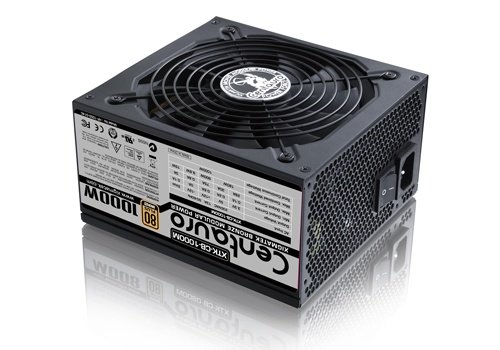
</p><p>Xigmatek&#8217;s Centauro 1000watt power supply isn&#8217;t big on fancy details; instead it approaches the challenges of providing a steady and efficient supply of power to your PC like a workhorse. Aside from its all black casing and massive fan to cool the PSU&#8217;s innards you&#8217;ll manage your system&#8217;s cabling quite nicely due to its modular setup. Its 1000watt rating will provide plenty of power for most workstation or gaming setups leaving you with one less thing to worry about. Since keeping energy costs in check is a big deal for end users you&#8217;ll be happy to know that the Centauro 1000watt is 80 PLUS certified which should mean that your power bills will be more manageable&#8230; at least until you get those massive gaming sessions under your belt.</p>
<p><a href="http://www.tweaktown.com/reviews/4717/xigmatek_centauro_1000_watt_power_supply_review/index.html">Xigmatek Centauro 1000-watt Power Supply Review</a> @ <em>TweakTown</em></p>
]]></content>
			<link rel="replies" type="text/html" href="http://www.techeta.com/xigmatek-centauro-1kw-power-supply/#comments" thr:count="0"/>
		<link rel="replies" type="application/atom+xml" href="http://www.techeta.com/xigmatek-centauro-1kw-power-supply/feed/atom/" thr:count="0"/>
		<thr:total>0</thr:total>
	</entry>
		<entry>
		<author>
			<name>Rafael Hernandez</name>
						<uri>http://www.techeta.com</uri>
					</author>
		<title type="html"><![CDATA[NVIDIA GeForce GTX 670 is gentler on your budget]]></title>
		<link rel="alternate" type="text/html" href="http://www.techeta.com/nvidia-geforce-gtx-670-is-gentler-on-your-budget/" />
		<id>http://www.techeta.com/?p=17297</id>
		<updated>2012-05-11T06:44:35Z</updated>
		<published>2012-05-11T06:44:35Z</published>
		<category scheme="http://www.techeta.com" term="Graphics Cards" /><category scheme="http://www.techeta.com" term="GeForce GTX 570" /><category scheme="http://www.techeta.com" term="Nvidia" /><category scheme="http://www.techeta.com" term="NVIDIA GeForce GTX 670" /><category scheme="http://www.techeta.com" term="video card" />		<summary type="html"><![CDATA[There&#8217;s no denying that NVIDIA&#8217;s GeForce GTX 680 is an incredibly fast and powerful video card but its price tag might push it out of range for many budgets so they&#8217;ve done some trimming and have come up with the GeForce GTX 670 GPU. The new model comes in with 1344 CUDA cores and a [&#8230;]]]></summary>
		<content type="html" xml:base="http://www.techeta.com/nvidia-geforce-gtx-670-is-gentler-on-your-budget/"><![CDATA[<p><a class="post_image_link" href="http://www.techeta.com/nvidia-geforce-gtx-670-is-gentler-on-your-budget/" title="Permanent link to NVIDIA GeForce GTX 670 is gentler on your budget"><img class="post_image aligncenter" src="http://www.techeta.com/wp-content/uploads/2012/05/NVIDIA-GeForce-GTX-670-video-card-image.jpg" width="500" height="245" alt="NVIDIA GeForce GTX 670 video card image" /></a>
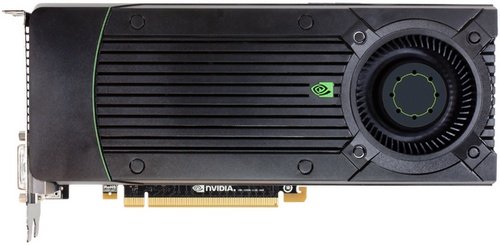
</p><p>There&#8217;s no denying that NVIDIA&#8217;s GeForce GTX 680 is an incredibly fast and powerful video card but its price tag might push it out of range for many budgets so they&#8217;ve done some trimming and have come up with the GeForce GTX 670 GPU. The new model comes in with 1344 CUDA cores and a 915MHz clock speed, compared to 1536 cores and a 1006MHz clock speed on the 680 so performance is sure to dip but they are saving you a decent chunk of change. On the plus side, they do keep the same memory configuration and memory clock speeds as the 680 so you&#8217;re not giving up much in that department and it should help keep things moving along quickly at high resolution settings.</p>
<p><a href="http://hothardware.com/Reviews/NVIDIA-GeForce-GTX-670-Reviews-EVGA-and-Gigabyte/">NVIDIA GeForce GTX 670 Reviews, EVGA and Gigabyte</a> @ <em>HotHardware</em></p>
]]></content>
			<link rel="replies" type="text/html" href="http://www.techeta.com/nvidia-geforce-gtx-670-is-gentler-on-your-budget/#comments" thr:count="0"/>
		<link rel="replies" type="application/atom+xml" href="http://www.techeta.com/nvidia-geforce-gtx-670-is-gentler-on-your-budget/feed/atom/" thr:count="0"/>
		<thr:total>0</thr:total>
	</entry>
	</feed>