The post The only constant…, by matt appeared first on Coffeemonk.
]]>I’m no topic blogger. I don’t have it in me. Hell, I’m barely a blogger. Reviewing twelve intermittent years of bipolar posts drove that point home, considering that probably at least 60% of my posts had a passing mention of how long it had been since the previous post, or had impatient comments from friends weeks later urging me to put up a new post. Of course, that was in the heyday of personal blogging, when it was all personality blogs by people you’d never met talking about the mundane details of their lives. In my mid-to-late twenties, my life was as mundane as they come, and I was awash in the angst of my lost years with little interest in foisting most of it on the general public. (I foisted plenty, but most of the angst I kept to myself.)
And so, bipolar was a personal blog, born of that time—a personality blog, an entertainment blog, an angst blog. Coffeemonk.com, on the other hand, was to be a semi-pro blog of ideals and intellectualism. A place where I could disect a zen koan, outline a productivity routine, or give back to the web development community in the form of educational or authoritative missives. In some small measure, I accomplished that—there are a few posts here that consistently bring traffic to the site, despite its practical abandonment.
More recently, I’ve experimented with an outlet that is more raw than either coffeemonk or even bipolar allowed me to be, and found that those semi-secret expressions felt more honest and enjoyable than most of what I’ve done here in the past three years.
So, in light of that, and in honor of the new visual direction in which I’ve taken the site, it’s now my intention to return to the original plan of making this a personal blog. Aside from the “storytime” podcast/posts, and a possible personal podcast I’m contemplating, the days of topic blogging are behind me. With luck and a strong tailwind, what you’ll see here will be more free, honest, and raw.
Now, since I did just launch this redesign of the site, I should take one moment to point you toward the revamped about page (which repeats some of what I’ve said above), and to the new get acquainted page, which lists this site’s popular posts and some of my favorites from here and elsewhere. The archives page lists every post on this site and features a tag grid if you like that sort of thing. Comments on posts are disabled by default; however, if you post or (publically) share links to individual posts, they should (theoretically) get picked up and displayed by the comment system.
I should point out that this new design direction was inspired, in no small part, by Leo Babauta’s efforts over on http://zenhabits.net/. My main goal was to keep things clean and simple, to focus on the words, and to provide a common experience across platforms and devices. The new design is “responsive,” which was a fun experiment; I’ll let you all discover the little differences on your own.
Thanks for visiting, I hope you enjoy the new look and the new direction.
The post The only constant…, by matt appeared first on Coffeemonk.
The post Photoshop Basics: Layer Naming, Ordering, and Nesting, by matt appeared first on Coffeemonk.
]]> Of all my Photoshop pet peeves, a PSD packed with poorly named layers may be the biggest one.
Designers make lots of layers and lots of layer copies during the course of a design, and they often “forget” to name the layers appropriately. We understand though, they’re busy people, right? In the coding world we deal with similar issues. When programmers don’t effectively comment their code, anyone coming in after them has no way of knowing why certain choices were made, or perhaps even what a particular block of code should be doing. Likewise, a single designer may know—as the creator of the file—that Layer 12 copy is the little red left-pointing arrow after the link text in the second-row third-column of the page layout, but if anyone else picks up this file, they won’t know what that layer is without taking several annoyingly time-consuming steps to figure it out.
It is crucial that designers name their layers appropriately, so they are understandable at a glance.
If you have two layers with elements that appear in row two column four of your design separated by five layers with elements that appear in row two column two of your design, it is terribly hard and incredibly annoying to find the elements that belong together. When you’re building your layout, you should always make sure that “physically” adjacent layers are also adjacent to one another in the layer stack, not separated by irrelevant layers.
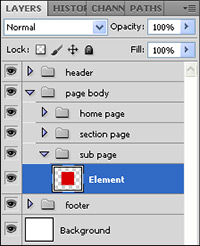 Photoshop 6’s introduction of layer “sets” (now called “groups”) partially alleviated these two major issues, especially the layer adjacency issue. With layer groups, especially nested groups, its easy to logically subdivide the layers based on content. A single PSD can accommodate layouts for every page of a site, separated into groups, which can be subdivided again representing specific areas on the pages themselves. You might create groups for the common sections of your layout, such as “Header” and “Footer” groups, as well as grouping layers by site section, or by page templates, if you do common templates rather than specific-page mockups.
The key, though, is in using all these things together to build a file that can easily and efficiently be picked up and added to or modified by a fellow designer, or utilized by your web developer.
You can go too far, however, and a future post will talk about keeping your layout file tidy and keeping the file size down, especially for your poor web developers who typically have lower-powered machines than their designer bretheren.
If you have your own ideas—or horror stories—about how best to manage the layers in the Photoshop document, I hope you’ll jump in and leave a comment.
The post Photoshop Basics: Layer Naming, Ordering, and Nesting, by matt appeared first on Coffeemonk.
The post Linux Toolbox: crontab, by matt appeared first on Coffeemonk.
]]>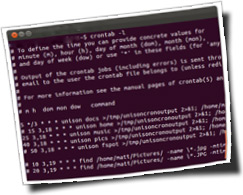 For those already familiar with unix-like operating systems, cron may be old news, while new users with limited command-line experience may never have heard of it. Cron is one of those system-level services that can be indispensable when you figure out what it does and how to use it.
In my typical mode somewhere between casual- and power-user, I have put cron to great use in running parts of my system beyond the stock configuration. For me, cron’s most critical role has been that of backup-scheduler.
What is cron?
Essentially, cron is a task scheduler—it hangs out in the background, waiting to run the tasks you define in its configuration file(s), called crontabs. The most basic use is to have a single user crontab containing a list of all the user’s scheduled tasks.
It might be worth pointing out that this is outside of the general system startup routines, which have their own configuration and process, and which aren’t so much scheduled as they are event-driven. Cron is used, however, to schedule regular system cleanup and maintenance routines in the background.
Using crontab
On my system, and I assume, most systems, cron is already setup and ready to go. There are really only a couple commands you need to know to manage your crontab.
crontab -l lists the current user’s crontab file, displaying all the currently scheduled tasks.
crontab -e will load the current user’s crontab file into your shell’s default editor. You may make any changes you need to make, save the file, and cron will automatically reload it. If you’ve introduced a syntax error, cron will fail to parse the file and will report the error to you—until you fix the error, your cron jobs will not run.
crontab Configuration
You can find more detailed information about the crontab syntax elsewhere, but basically, you can schedule a task by minute and hour, and by day of month, month, or day of week. For example, you can schedule a task to run at 16:12 on the 28th day of the 2nd month, or at 16:12 every Thursday. You could conceivably schedule a task to run every minute of every hour of every day, of every month. You generally can’t, however, schedule tasks by the second, nor can you schedule tasks that only run once*. Though you could conceivably schedule a task that would only run 13 times in 400 years, if you scheduled it on a Sunday, Tuesday, or Thursday that was also the 29th day of the 2nd month.
As for tasks, you are almost unlimited in what you can do. Each crontab rule will take a full bash command string, as long the command fits on a single line. More often than not, I will have cron run scripts that I’ve written, but I have used a few straight bash commandlines in the past. It may help to know that you can put multiple commands on a single bash commandline if you separate them with a semicolon.
Real-world Examples
As I mostly use cron to control backups, here are two quick examples:
50 4 8,28 * * ~/scripts/websiteBackup coffeemonk.com 1> /dev/null 2>&1
websiteBackup is a script I cobbled together to use wget to pull down a regular full-site backup (via FTP) of my various websites. I have cron run this at different times for each site depending on how often they’re updated, and usually staggered by anywhere from 5 to 20 minutes depending on each site’s overall size. In this case, I have cron set to backup coffeemonk.com on the 8th and 28th days of every month, at 4:50am.
25 3,18 * * * unison music >/tmp/unicronout 2>&1; ~/scripts/eunisonerrs
I back up my music files to a local file server using the unison synchronization utility. I have a few different unison scripts for backing up different parts of my system. This particular entry runs my unison music sync script every day at 3:25am and 6:25pm.
Digging Deeper
So far, I have been able to accomplish everything using the single user crontab. I have, however, seen mention of daily, weekly, and monthly crontabs, which appear to be connected to anacron—another system service that is dependent on cron.
To schedule a job that needs to run once at a specific time in the future, the command at might be your answer. I haven’t used it extensively, but it seems to have great potential.
If you need to schedule system-level tasks to run at startup/shutdown, you’ll want to look into init or ubuntu’s new upstart system, which is an event-driven, rather than time-based scheduler.
Really, this is only a surface-level introduction to task scheduling, and to cron in particular, so if you have a different or better way of handling this stuff, or if you have some more real-world examples you’d like to share, please leave a comment.
* it seems some implementations of cron offer support for seconds and/or years in the crontab file.
The post Linux Toolbox: crontab, by matt appeared first on Coffeemonk.
The post Cravings and Desires that Cause (me) Suffering, by matt appeared first on Coffeemonk.
]]> In evaluating my life, especially in the context of all the buddhist dharma talks I listen to every week, it seemed it might be fitting to take a look at how the 2nd Noble Truth plays out in my life.
To that end, I’ve compiled a short list of some of the cravings and desires that are currently causing me suffering.
Freedom and Time
There’s so much that I want to do with my life, and the time and opportunities always seem limited. I find myself struggling to accept that I simply don’t have the freedom or the time to do all that I want to do.
Approval and Respect
This one is particularly pernicious—half the time I don’t recognize it driving me, or realize when I’m ardently seeking it. I’m afraid that the things I accomplish won’t be seen as worthwhile or good, and that no one will respect even the efforts that I’ve made to complete them. This isn’t so much about personal approval or respect, but rather approval and respect of what I do, or of what I’ve made or created.
Motivation and Energy
We all have bad days, I believe, but when I have a string of bad days where I can’t dislodge myself from the couch, or tear myself from the distractions in my life, I berate myself for my lack of motivation. When I’m too tired to take advantage of what fleeting motivation I may have, I chastise myself for my inappropriate, unhealthy sleep habits.
Talent and Ability
More damning than my need for Approval and Respect is the fear that I completely lack any talent or ability in the things that I want to do. I’m afraid that even I won’t like or appreciate what I accomplish, because I will only see where I’ve failed, or will only discern my distinct lack of talent.
Vision and Imagination
I also worry that, even if I find the motivation and energy, and even if I posses the talent and ability to do what I want to do, I’ll never have the vision to accomplish anything truly worthwhile. I worry that my ideas and imagination will be so limited in breadth and depth that the things I accomplish will be completely uninteresting and unexciting.
These few things are only a fraction of my afflictions, and tomorrow may find me beset by an entirely different set of demons. In the meantime, my hope is that, by identifying and naming them, I may loosen their grip on me.
If you’ve had success wrestling the causes of your own suffering, I hope you’ll share a bit of your story in the comments.
The post Cravings and Desires that Cause (me) Suffering, by matt appeared first on Coffeemonk.
The post Photoshop Basics: Clipping Transparent Images, by matt appeared first on Coffeemonk.
]]>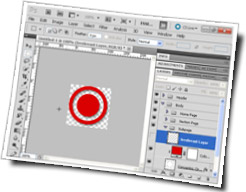 For web developers, especially in this almost-but-not-quite-post-IE6 age of universal 24-bit PNG acceptance, the one thing you’re likely to do more than any other, at least in regards to Photoshop, is to extract and save images with transparent backgrounds (AKA alpha channels). Whether you’re using GIF or PNG, there are several ways to do it, and several common issues you might have to deal with.
Quick and Easy
When you have well-constructed PSD files—with properly named and logically grouped layers, and all the elements in their own layers or layer groups—your designer has made your life a little easier. You should buy them a cookie.
The first two techniques work best with these well-made PSD files, as the first step in both is to hide any irrelevant layers. You should only see the layers for the element itself, as well as any layers that augment or affect it, such as if the element requires a separate shadow or adjustment layer.
If the element I’m working with fits the above criteria, the technique I use most often is to simply crop away everything except for the element itself. This comes in especially handy when you’ll need to alter it later. If the element is a common one that you might need to make several versions of, you could save this cropped image as a separate PSD file, and return to it later to create them. This has proven especially helpful for such things as image buttons, headers, and nav items, though I used to use it a lot more before the days of CSS @font-face declarations and open font licenses. Still, it’s a potentially handy trick to keep in mind.
The second technique is to make a selection around what you need to extract, then “copy from all layers” (Cmd-Shift-C), and paste (Cmd-v) into a new document. Using single-layer copy—regular ol’ Cmd-c—results in the loss of any layer effects.
The next technique requires a simpler element (with no cross-layer interaction) on its own layer. In this case, you may drag and drop the layer from the layer palette, or use the move tool to move the element itself, into an open document. This technique depends on which version of Photoshop you’re running, as well as on which window “layout” you’re using. For example, you can drag a layer from the palette into another window in multi-window mode, but you can’t do it in tabbed-window mode. (I’m probably not calling those by their official Photoshop names, but whatever, you get the idea.)
For these last two techniques, once the layer/element is placed in the new document, you can use one of the cropping techniques mentioned in my earlier Photoshop Basics post to trim unnecessary surrounding space.
More Difficult
If the element you need to extract isn’t itself transparent—if it’s been merged into another layer, or you’re working from a flattened file with no layers or an existing element that was saved without transparency—you have a harder row to hoe. In this case, there are two techniques I know which might help.
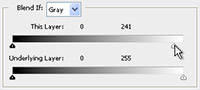 If you have a pre-existing non-transparent element, and it’s on a solid-color (hopefully white or black) background, you might be able to use layer blending options to selectively drop out the background color. This works best for images with limited color palettes, where there is little to none of the background color in the element itself. Black and white logos, line-art, or similar things work great with this trick.
If you’re unlucky enough to be working from something more complex, your only remaining option may be Photoshop’s powerful suite of masking tools, or, heaven forbid, the eraser tool. More recent versions of Photoshop have added some very powerful selection/masking tools, and have even added things like the “Refine Edge” tool, which help you do in minutes what previous Photoshop professionals worked hours to accomplish.
If you get to this point, and you are contemplating simply using the eraser tool to clean up an element or remove a background, please… STOP. The eraser may be fine for super-quick, one-off things, but if there’s even a remote chance you’ll have to return to the file for any reason ever again, I strongly, strongly suggest you use layer masks instead. With layer masks, you’re merely hiding parts of the image, rather than completely destroying those parts as you do with the eraser tool.
These last two cases are where you’d simply turn the file around and send it back to the designer with a slab of raw beef and a starving Rottweiler, along with a note that demands they either get you a useable PSD, or you tie the beef around their neck and let the dog loose.
The above should cover most of what you’ll see, as there’s little reason to use anything other than PNGs anymore, however…
You, Rastered!
 First, if for some reason you’re stuck with the GIF file format—meaning a limited-palette raster image with no true alpha channel—and your designer is a masochist who likes putting complex backgrounds behind transparent elements, the key thing to remember is how your matte-color and anti-aliasing works. The big problem with transparent GIF images is fringe, which is the little “halo” around the edges of the image where it blends with the background or “matte” color. This matte color can be anything, but it has to be a solid color. If you use a transparent GIF with a white matte on a page with a black background, you’ll see the white fringe around the edge.
 In some cases, there’s just no avoiding fringe, and you may have to go back to your designer and ask them to redesign it to remove the complex background. However, if the background is a simple and subtle gradient, or if you have a complex background that is nevertheless fairly uniform in color, you might be able to get away with it.
If you know where on the gradient your image will sit, you can pick a matte color in the middle of that area of the gradient. You might get a little fringe on the top or bottom, but hopefully, if the gradient is subtle enough, it won’t really be noticeable.
Likewise, if your complex, say patterned background is fairly uniform in color, picking a happy medium between the major colors might give you fringe that is nearly undetectable.
If you find these methods helpful, or if you have your own methods of dealing with extracting transparent images from Photoshop layouts, please let us hear about it in the comments!
The post Photoshop Basics: Clipping Transparent Images, by matt appeared first on Coffeemonk.
The post Drinking from the Firehose, by matt appeared first on Coffeemonk.
]]> When RSS feeds, readers, and aggregators were new, the manner of presentation was often referred to as a “River of News.” In the modern internet era, now that almost everything you could ever want to know about is available almost instantaneously online, what once was a “river” is now a flood, or, as some have taken to calling it, a “firehose.”
So, faced with this deluge of data, how do you cope? There are certainly many ways, so I’ll just cover the method I use.
Firstly, there’s no way I can visit every website I’m interested in every day just to see if they’ve posted an update or not, so I depend on RSS (or ATOM) feeds. Nearly every blog or news site has an RSS feed that is updated whenever a new blog post or news item is added. As “structured data” containers, the RSS feeds alone aren’t enough—you need something to present the data in a more pleasing and manageable format, which is where feed readers and aggregators come in.
In the past, I tried many readers and aggregators, but found desktop software too limiting and most of the web-based applications too clunky. I settled on bloglines.com for a while, but eventually transitioned to Google Reader. Reader provided everything I needed, namely: the ability to add any feed, an aggregated “river of news” style view, and plenty of keyboard shortcuts for navigation.
I used Google Reader exclusively for years, and got into a good routine with it, where I could go through an entire day’s worth of feed updates in roughly 15 minutes unless there were some particularly juicy things to read. As I added more and more feeds, however, it became harder and harder to keep up with the onslaught. Occasionally, things I had saved for later (by leaving unread) would fall off the end of Reader’s cache, or I’d have to declare feed bankruptcy and mark everything as “read” to get a clean slate. The latter was very rare, while the former happened more and more often. I also regularly pruned feeds that were no longer updated, or that I no longer bothered to read.
Still, a 15 minute daily routine eventually turned into a 30 – 45 minute twice-daily routine. Throw Twitter and Facebook on top of that, and suddenly, my manageable 20 minute morning routine (email & news) had ballooned into an hour or more every morning, and often another half-hour at night. Not to mention the 5 minute check-ins sprinkled throughout the day between tasks.
How – Using Google Reader
There’s no trick to plowing through hundreds of news items every morning, aside from judicial skimming and knowledge of a few keyboard shortcuts.
I eventually stopped using the overall “river of news” style feed layout, and started reading by folder. I assigned feeds to logical groups, each of which I handled slightly differently. Groups containing articles of which I’ll read a few paragraphs get displayed in full (“expanded” view), while groups containing articles I rarely read get displayed as headlines only (“list” view).
The keyboard shortcuts I used most often were:
- 1
- display items in “expanded” view
- 2
- display items in “list” view
- shift-n / p
- navigates between feeds, rather than articles
- shift-a
- mark all items in current view as read
I used this constantly when getting to a feed I knew I didn’t need to read in detail. I would skim the headlines, and if I saw nothing of interest, would simply mark all as read and move on. If something caught my eye, I’d “n” down to it and read it before marking all as read. - n / p
- select next / previous item in list (without opening them)
This was my primary mode of navigating between items in a list, as it would leave items unread. - o
- open / close the currently selected item
used when I’m done reading an item, or when I decide to read an item I’ve already selected via “n” - j / k
- select next / previous item in list
I would use j if I saw that the next item in the list was one I wanted to read in more detail, as it would select and open that item. When I started viewing nearly every folder in “list” view, I primarily used “j” on feeds from which I typically read most of the articles. - m
- mark the currently selected item as un-read / read.
If I wanted to return later to finish reading something, but didn’t want to save it with a star, I’d simply mark it un-read and it would remain in my feed. - s
- star (favorite) or un-star the currently selected item
if the item is one I might want to return to read later, or take some other action with, I’ll star it. - v
- opens original item in new tab/window
I used this very rarely, as I usually preferred to click a link in the article, for whatever reason.
Beyond Google Reader
At some point, keeping up with Google Reader simply became too much, and I gave it up for months. Later I discovered Feedly, which acts as a sort of overlay to Google Reader, provides similiar keyboard shortcuts, and presents the articles in a much more appealing, magazine-like format. There is a companion iOS app as well, which is perhaps even more functional than the web app. Feedly got me back to reading my news feeds on a regular basis, and I even found that I read them more on my iPhone during lulls in activity, or when out and about, than I do on the web.
Managing feeds
Even with mastery of proper tools, you have to also master your input.
When it comes to your feeds, you have to be ruthless. You may collect new feeds everyday, but you also have to pay attention to when the signal-to-noise ratio gets too high, or when you’ve simply stopped paying attention to one or more of them. If you’re not getting anything from a feed, cut it loose. Also, as you get comfortable managing the deluge, you’ll get a feel for which feeds you typically read in depth, and which you can simply skim and mark as read.
Saving for Later
You also need to develop a quick eye for things you want to read more in depth, or take your time with, and figure out a way to mark them for later reading. I’m planning another post on just this topic for later, but you will have noticed my comments about favoriting, or leaving or marking things as “un-read” above, which are decent but imperfect methods. There are also other apps or services like Instapaper, Readability, Delicious, or Pinboard that exist expressly for saving content, or links to content, for later use. Again, more about how I handle this in another post.
I would love to know how others handle the onslaught of information, especially if you have a faster/more efficient means of cutting through the deadwood, so please leave a comment!
The post Drinking from the Firehose, by matt appeared first on Coffeemonk.
The post Motivation and Inertia, by matt appeared first on Coffeemonk.
]]> If you ever want to accomplish anything in this world, the one critical thing you need before and more than anything else is motivation.
Whether it’s internal, external, mental, physical, spiritual, psychological, magical, emotional, or unintentional, you’ve got to have something that makes you get up off your ass and into the workshop (whatever form that might take for you).
Of course, as you can see based on the long spells between posts on this very blog, I’m not exactly a shining example of motivation and productivity… which is precisely why I’m talking about motivation and productivity—this post is as much for my benefit as for yours.
What’s MY problem?
So, what’s wrong with me, exactly? Or, rather, what is my experience in these regards?
I’ve talked elsewhere about passion and drive, and I believe that’s part of my issue. Not having something you’re truly passionate about that drives you can make it difficult to dredge up the motivation to do… anything, really.
For me personally, motivation comes in waves. I’m not manic-depressive, but I have bursts of motivation and unmotivation that play out over weeks or months, often accompanied by their own highs and lows in emotional and psychological well-being. I also seem to be at the mercy of external forces, in that a long, rewarding period of productivity can be instantly and completely derailed by even a single tough day that knocks me out of my productive routine.
I still struggle with getting back on the horse after a fall, but I have identified a few things that sometimes help.
Suffering from Motivational Inertia
I’ve found that I have what I call “motivational inertia,” especially in regards to recovering my productivity. When you’re happily plowing through every episode of a beloved TV series in order (thanks, Netflix!), or you’re simply in a comfortable, but unproductive routine, it can be hard to overcome the inertia. You think, well, sure I’d like to get up and do this, or even I need to get up and do this, but, well, I’m on episode 25 out of 26 this season, and I can just finish up this season and do it tomorrow. Or, you think, I know I should, but… the dishes need washing, the room needs straightening, and I still need to spend time with my wife/partner/significant-other/child/dog/pillow pet/whatever. If there are multiple things vying for your time and attention, the one you’re already doing will probably exert the strongest influence.
Overcoming Inertia
The best way I’ve found to free yourself from unproductive inertia is to take the thing or project you’ve been nagging yourself about and break into the smallest discrete chunk that you can reasonably accomplish considering your currently resistant state of mind. If you’re familiar with the system, this is roughly akin to finding the project’s “Next Action.”
In some cases, it can help to find something else to work on—something smaller, with a shorter time-frame. Maybe it’s something you don’t need to do, per se, but something you’d simply like to do. Often, getting one small, even unrelated, task done can warm up your productive muscles and get your mind right for pursuing the next larger chunk, or to tackle the thing you really want to do.
Manufacturing Motivation
Sometimes, the only thing to do is to put the brakes on whatever is holding you back. Eliminate the thing that is unproductively eating up your time, or if you can’t eliminate it—NOT cooking dinner for your family isn’t a viable long-term solution—at least take a step back to see how to streamline or reduce its impact. The time you free up will often blossom into the motivation you’re seeking. Of course, this requires its own motivation; but sometimes ceasing to do something, while not pressuring yourself to fill the time with something else, can often be easier than forcing yourself to squeeze productive time into your already full, albeit unproductive schedule.
Another way might be through self-flagellation—either psyching yourself up or dressing yourself down. I’ve personally never found it helpful, but that’s probably because I tend toward self-reproach, rather than self-promotion.
A third way might be the Nike way. Rather than chewing yourself out, or setting us up the bomb on your comfy routines, you just stand up (or sit down) and make it happen. You want it, you just gotta do it.
Oh, and the last way may be to simply let the routine play itself out. If you’ve gotten yourself into something with a definite end in sight (like, say, watching every episode of Star Trek ever made, perhaps), you may just want to ride it out. Sink into the routine, nurse it, encourage it along, and then when it’s done, don’t allow it to transition into something else. Hit the end-point, and be done with it. You’ll immediately have more free time, which you can then more easily fill with whatever you should’ve been doing in the first place.
WFM, YMMV
So, out of all this, what works for me?
Firstly, breaking larger projects into chunks has helped me get back in the game, especially if the larger project has a foreseeable end-point. I’ve also had success with eliminating time sinks, like with my January 2012 social-media sabbatical, which has brought you this post, however much later you read it. And I’ve also, as you might’ve guessed, had fun plowing through blocks of TV shows every few months. I started watching Voyager back in October 2011, and finished it and The Animated Series (also of Star Trek) in December, handily coinciding with my social-media sabbatical. Those two things–restricting myself and indulging myself respectively, have made January 2012 my most productive month in quite a while.
I’m still fighting motivational inertia, because damn, it’s much easier to sit on the couch and watch TV with my wife than it is to tear myself away from her to work on some ephemeral, long-term project or pursue some harebrained scheme.
If you struggle with motivational inertia, or have your own tips or advice for overcoming it, please leave a comment, and help the rest of us out!
The post Motivation and Inertia, by matt appeared first on Coffeemonk.
The post Better Page Titles, by matt appeared first on Coffeemonk.
]]> Much of web development comes down to personal taste. How you indent your code, whether you use b & i or strong and em tags, whether you compartmentalize all your styles into neat little external stylesheets or liberally pepper your HTML with inline styles; most of these types of decisions have little bearing on the functionality or even “correctness” of your code. Likewise, there are many ways to handle some of the common elements that fall within the domain of that most sneaky of snake-oil salesmen—the SEO expert.
But I’ve spoken before of my disdain for that profession. What I’m going to talk about now is one little nugget in that arena:
The Title Tag
It’s a fundamental piece of the HTML standard, and there are probably as many ways of using it as there are websites. This is my personal take, based on my preferences and my 14 years (only 10 professional years, mind you) of web development experience.
As with most things HTML, many SEO experts suggest that your title tag should be chock full of site- or (hopefully) page-relevant keywords, to help reinforce the search engines’ association of your page with those keywords. (“Hey, it’s in the title, the h1, the img alt tag, and peppered throughout the page, the page *must* be about this!”) Honestly, while having keywords in your page titles certainly will help to some extent, the necessity and actual benefit of the practice are often grossly overstated.
Unfortunately, the SEO experts with whom I’ve worked seem to give the title tag little thought beyond the stuffing of keywords as a means to a very singular and limited end, and give little to no thought to how users interact with a page, or how browsers or other tools handle or present such information.
So, how are page titles really used, by search engines and other tools, and by people and their browsers?
In Action
The title tag doesn’t contain the bulk of the content a user sees or interacts with, but it does appear in a myriad of critical and useful places and ways. Back when browsers had title bars, the title tag appeared there, prominently displayed at the top of the browser window. Now that tabs have taken over, and, in fact, completely displaced the title bar in many cases, the page title now typically populates the tab itself. Depending on how many tabs you have open, you might see four or five words of a page title, or you might see three to five characters. In some ways, this has made the page title less critical to the end-user with a modern browser.
Nevertheless, many other tools—like bookmarking (delicious, pinboard, or browser-native), and social sharing tools—prominently feature the page title whenever you save or share a link. In these cases, having a well-formed page title will help users recognize your content later when they go back to retrieve it.
Delving into the search engine world, but remaining human- rather than ‘bot-focused, we know that most search engines use the page title as the text of the main links in their search results, or at least feature it prominently. Here again, having a well-formed page title may help a user more easily recognize yours as valuable content worthy of their time.
As for search engine spiders, ‘bots, or indexing engines, the page title is merely a piece of content in a sea of content. Perhaps a particular engine weights the page title heavier than, say, an img alt tag, or the h1 of a page, but it’s still just one piece of content out of several on a single page. At least one search engine (*the* search engine, Google) has said they’re building their system to look beyond such obvious tricks as keyword-stuffing so they can get to what matters—the actual content, and the value of the content as determined by other active and reputable internet citizens. So, at least in Google’s case, I’d wager that page titles—keyword-stuffed or not—have little impact on a page’s ranking.
An Example
So, after all that, let’s look at an example. Say we’re building a site to sell Pet Rocks, and we have a new pet in the Sedimentary category named Limestone Louie.
Going by common SEO practices, you’d likely end up with a page title like this:
Pet Rock | My Pet Rock | Sedimentary Rock Pets | Rock Pets | MyPetRock.com
This crams in a bunch of keywords, but is it going to make any sense to the consumer? Is it going to help them find your tab in their browser, find their browser window in their task bar, or decide to click your link on a search engine results page? Yeah, probably not so much. This is just a mess of keywords without regard to the end user—your customer.
My opinion is that a page title should represent the hierarchy of your site, forward or backward (with backward being best). For instance, either of these would be a huge improvement:
MyPetRock.com | Pet Rocks | Sedimentary Pets | Limestone Louie
or:
Limestone Louie | Sedimentary Pets | Pet Rocks | MyPetRock.com
The second one is best, because it’s legible, it’s hierarchical, it conveys to a higher degree of precision what this particular page is about, it better positions your branding (by not burying it in an avalanche of keywords), and it will actually function reasonably well in most end-user scenarios.
Again, as with most things HTML, there’s no “one true way,” but this is a damn good starting point.
If you have your own preferred way of handling page titles, feel free to share by leaving a comment below!
The post Better Page Titles, by matt appeared first on Coffeemonk.
The post Photoshop Basics: Quick Tips and Tricks, My Setup, by matt appeared first on Coffeemonk.
]]> With my post about pixel-perfect guides in Photoshop consistently being the site’s most popular, I thought a new series of Photoshop-related posts might be in order. This will be the first of an irregular series about Photoshop Basics, wherein I’ll talk about some of my most used—but basic—tips, tricks, shortcuts, and skills to help you use Photoshop more efficiently or effectively.
What follows is a smorgasbord of quick tips that, as a web developer, I use nearly every day.
The Marquee tool is your best friend
 As I mentioned in the comments on the pixel-perfect guides post, the marquee tool (keyboard shortcut: m) is the most frequently active tool in my Photoshop toolbox. Aside from its utility as a guide-placement aide, I also use it to quickly extract elements from a layout, to measure element size or spacing, or to define crop- and fill-areas.
Element Extraction
The marquee tool is a selection tool, meant to allow you to define a working area. I use it most often to select an element—like thumbnails, buttons, embellishments, bits of backgrounds, whatever—that I need to save as a separate image file.
First, make a selection around the element; it doesn’t have to be precise, you can refine it later. You may also press the space-bar while you’re defining your selection to move it around before committing the size and position. Next, copy (Cmd- C) the selection to the clipboard, create a new document (Cmd- N, Enter), and paste (Cmd- V) the copied element into the new document.
Now you can save or export the element, or, if necessary, you can refine it further using the following cropping technique.
Cropping
The crop tool allows you to alter a crop area after you define it, but for simple crops, the marquee tool is often just as quick, if not quicker, especially if you have assigned a keyboard shortcut to the crop menu item. Cropping, rather than copy/pasting a selection, is an easier way to extract an element requiring transparency.
To use this technique, you simply define a selection around your element as above, then select the Crop menu item from the Image menu, or use your keyboard shortcut. If you’re using this technique to preserve transparency around (or within) an element, you should turn off any layers that are visible within the transparent areas before you save or export to a file.
To refine an element I’ve already separated using one of the above techniques, I’ll often Select All (Cmd- A), move the resulting selection down and to the right (using the arrow keys) to where the element’s top and left edges should be, then crop. Then I’ll move the selection up and to the left to where the element’s bottom and right edges should be, and crop again. This may seem a bit fiddly, and unnecessary if you take care when making your initial selections, but you’d be surprised how often a seemingly accurate selection is off by a pixel or two, leaving you to clean it up afterward anyway. Also, dealing with less-well-defined edges, like drop shadows, can sometimes be easier when you’ve already cropped away nearby distracting elements.
Measurements and Spacing
To use the marquee tool for measurements, simply draw a square selection around—or between—the object(s) you need to measure, then check the selection’s pixel dimensions in the Info panel.
If I want to ensure consistent spacing between members of a group of elements, I might draw a marquee the size of the intended white-space, then simply move that selection around to establish or double-check the positioning of the other elements.
If you’re using this technique to establish spacing, it works best to first set all your guides using the selection, deselect it (Cmd-d), then create or move your elements into place. If you’re using it to double-check alignment or spacing, don’t forget to deselect the selection before attempting to move an offending element. If you attempt to move an element while you have an active selection, the move tool will affect the contents of the selection, rather than the layer as a whole, which in this case is probably not your intention.
Filling and Painting
If you want to fill a discrete area with a color (or gradient, or whatever), you can define a selection using the marquee tool and use fill shortcuts (like Cmd-backspace) or the Fill menu item. You can do the same thing to fill an entire layer, by doing “Select All”, but it isn’t necessary since using fill with NO selection automatically fills the entire layer.
Also, when using the various paint, erase, or manipulation tools (smudge, blur, etc.), an active selection will confine their effect, thereby protecting areas of the image outside that selection.
Most of the above tips will work with any of the selection tools, but I typically use the square marquee tool for these since its simple geometry makes it easier to obtain measurements and spacing.
Move Tool for Layer Discovery
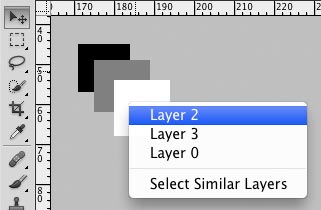 The move tool also can serve many purposes, one interesting and very useful (but not immediately apparent) one being its ability to help you discover the layer on which a visible element resides. To do this, with the move tool active, simply right-click (or Ctrl-click, I think, for you single button-ers) on the layout element you’re attempting to isolate, and a context menu will pop up containing a list of all the layers which have content under the mouse pointer’s current position.
If your creative designers are cruel, evil people, it may be difficult to figure out which Layer 10, or Layer 10 copy, is the appropriate one. If however, they are caring, thoughtful designers who appropriately name and nest their layers, it should be readily apparent which layer, or at least which layer group, contains your element. Select the layer you think contains your element from the list, and that layer should be selected and scrolled-to in the Layers pallet. You can check whether you picked correctly by clicking the eyeball icon on the selected layer to hide/show it, and see if the element disappears. If not, try a few other eyeballs until you hit the right one.
Quick Trimming and Cropping
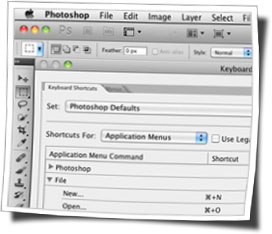
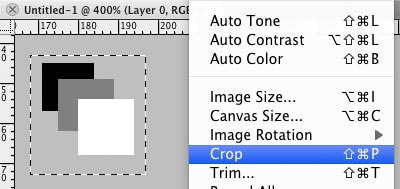 Back when I was forced to use Windows on a daily basis, I could easily jump to any menu item by means of the Alt-key dance. For instance, to initiate the crop menu item, I’d hit Alt, then I, Then P, and it’d be done. I became really good at this, and had several of these menu items committed to muscle memory. I’ve since been allowed to move to Mac, but have yet to discover such a simple way of activating menu items that don’t have pre-defined keyboard shortcuts. Because the lack of shortcuts for Crop and Trim were causing me grief, I’ve set up custom shortcuts.
Thankfully, you can easily set your own keyboard shortcuts using Mac’s Keyboard Preferences. I have my Crop menu item setup with Cmd-Shift-P, and the Trim tool with Cmd-Shift-T. Now I can make a marquee selection, hit my keyboard shortcut, and have my crop completed in a fraction of the time it would take me to mouse up to the menu.
Quickly Select a Layer’s Contents
To quickly make a selection around the contents of a particular layer, simply hold down the Cmd key (Ctrl for you PC guys, I think) and click on the layer thumbnail in the Layers palette. Photoshop will create a selection containing all the visible elements on the layer, respecting transparent areas around the outside (which will be partially selected depending on their level of transparency). I believe this works for most layer types, but probably not for all (like effects or filter layers, I imagine).
The More You Know: Keyboard Shortcuts
I mentioned a couple of the custom shortcuts I use, and you may well have some of your own favorite or often-used features that need the same treatment, but Photoshop does have many simple and very useful pre-defined keyboard shortcuts. Some of them, mainly items in the toolbox, don’t even require modifier keys like Cmd, Ctrl, or Alt. Here are the ones I find myself using most often:
- m
- activates the marquee tool
- v
- activates the move tool
- z
- activates the zoom tool
- Cmd-d
- de-selects an active selection
- spacebar
- when using many of Photoshop’s tools, pressing the space bar will temporarily switch to the “hand” tool.
- num keys
- with many of the non-paint tools, hitting a number-key will alter the current layer’s opacity (0-9 for 0-90%, 100 for 100%); while with a paint-related tool, the number keys will usually affect the tool’s opacity.
- Cmd- 0, Cmd- 1, Cmd- +, Cmd- –
- Combined with the “Command” key, the Zero, One, Plus, and Minus keys control the zoom-level of the currently active window. Cmd- 0 (zero) zooms to fit the current file or selection to screen. Cmd- 1 (one) zooms to 100%, or “actual pixels” view. Cmd- + (plus) zooms in, while Cmd- – (minus) zooms out. Cmd- 0 is especially useful, for example, when transforming an item that is larger than will fit within the current viewport—using Cmd- 0 in this instance will zoom out so that all of the transform handles are in view.
- Cmd- ;
- Shows or hides the guide lines that assist in checking—or enforcing—alignment of elements.
- Cmd- Option- Shift- S
- Initiates the “Save for Web and Devices” function, which allows you to export files that are optimized for specific uses. As a web developer, this is the most common way I save files when I’m extracting elements for a new site. (note: I believe this is part of the default keyboard shortcut set on Windows, but it may not be on Mac. Check your setup, and if you’re a web developer, you need a keyboard shortcut for this function.)
I hope that these tips and tricks come in handy, and maybe give you a different perspective on some of Photoshop’s tools. Again, I use many of these tricks every single time I run Photoshop, and I know that learning them has saved me incalculable time and effort.
If you find these—or variations on these—to be useful, I hope you’ll chime in with a comment to let me know how they’ve helped you. If you use other basic things like this that make your life easier every day, and that I didn’t cover, I hope you’ll add them to the discussion as well.
The post Photoshop Basics: Quick Tips and Tricks, My Setup, by matt appeared first on Coffeemonk.
The post Linux Toolbox: Typing Extended Characters, by matt appeared first on Coffeemonk.
]]>
Though I’ve long known of the Windows Alt- and Mac Option-key codes for producing extended characters, I’ve only recently discovered a couple different shortcuts that allow the same thing under Linux.
A discussion at Daily Writing Tips about em-dashes, specifically regarding when to use them, spun in the direction of how to produce em-dash characters.
The immediate and obvious suggestion was to rely on word processors’ automatic character replacement—which generally involves swapping out two minus signs for “—” as-you-type. It was also pointed out, however, that there are specific key sequences you can use within different OSes to produce these characters without benefit of a word processor.
Direct/Universal Entry
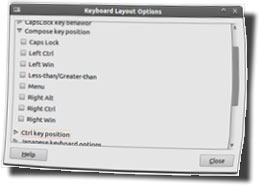
For accomplishing this on Linux, one of the commenters offered up a sequence that included a “Compose” key—a key I was not familiar with. It turns out, the “Compose” key was apparently present on some older systems, but isn’t on “standard” US keyboards. It is possible, however, to turn one of your “extra” keys into a compose key, should you wish, using your system’s keyboard preferences.
The Compose key sequences provide an easy-to-remember way to create extended characters, largely using “logical” key grouping to produce, for example, an “ã” by combining a “~” with an “a” character. In the case of an em-dash, the sequence is minus-minus-minus. (I attempted entering this as characters, but, interestingly enough, WordPress automatically converts three minus signs into an em-dash.)
For those of us without “Compose” keys, or who prefer to stick with the default keyboard layout, there is another option—the key sequence Ctrl-Shift-u allows you to enter the Unicode value of any character you want to produce. For an em-dash the value is 2014, so you’d press Ctrl-Shift-u, then 2014, then enter. The downside to the Unicode method is that you need to know or have all the unicode values handy for the keys you might want to use.
Windows and Mac users have their own key sequences, and requirements. Windows users also have to memorize a table of numerical character values, while the Mac implementation is more similar to the ComposeKey sequences, using key sequences and modifiers.
To recap our em-dash example:
For Linux:
<composekey>, ---ComposeKey Sequences | Unicode Characters
OR
Ctrl-Shift-u, 2014, <enter>.
For Windows:
Alt-0151Alt key sequences
For Mac:
Shift-Option-minusOption key sequences
Less Direct Methods
Of course, there are also other, less direct methods to get some of the characters. Windows and most Linux distros should come with a Character Map app of some kind, which will let you see all the special characters, and usually copy and paste them. I don’t know offhand of an app that comes with Mac OS X by default, but there are certainly some to be found—I have one on my dashboard at work.
Recently, and part of what has prompted this post, I have found myself either going to a web page that I know has an em-dash in it, or simply Googling “em-dash” and copy/pasting the first instance I find in the results. This is one of those crazy internet-enabled “workaround” methods that I’ve been too lazy or too busy to find an alternative for, before now.
If you’re a heavy keyboard user, the above methods will improve your efficiency when using special characters, but, of course, it also depends on your willingness or ability to memorize character codes or key sequences.
Do you have a preferred method of producing these characters? Maybe you’ve put together a cheat-sheet to help you learn (or off-load the need to learn) the various codes and sequences? I’d be interested to hear how you deal with these special characters in your daily work. Go ahead and leave us a comment and share what you’ve found most helpful.
The post Linux Toolbox: Typing Extended Characters, by matt appeared first on Coffeemonk.