<br />
<b>Deprecated</b>:  Assigning the return value of new by reference is deprecated in <b>/home/sloki/user/t66542/sites/blog.zulsdesign.com/www/wp-settings.php</b> on line <b>520</b><br />
<br />
<b>Deprecated</b>:  Assigning the return value of new by reference is deprecated in <b>/home/sloki/user/t66542/sites/blog.zulsdesign.com/www/wp-settings.php</b> on line <b>535</b><br />
<br />
<b>Deprecated</b>:  Assigning the return value of new by reference is deprecated in <b>/home/sloki/user/t66542/sites/blog.zulsdesign.com/www/wp-settings.php</b> on line <b>542</b><br />
<br />
<b>Deprecated</b>:  Assigning the return value of new by reference is deprecated in <b>/home/sloki/user/t66542/sites/blog.zulsdesign.com/www/wp-settings.php</b> on line <b>578</b><br />
<br />
<b>Deprecated</b>:  Function set_magic_quotes_runtime() is deprecated in <b>/home/sloki/user/t66542/sites/blog.zulsdesign.com/www/wp-settings.php</b> on line <b>18</b><br />
<br />
<b>Warning</b>:  Cannot modify header information - headers already sent by (output started at /home/sloki/user/t66542/sites/blog.zulsdesign.com/www/wp-settings.php:520) in <b>/home/sloki/user/t66542/sites/blog.zulsdesign.com/www/wp-includes/feed-rss2.php</b> on line <b>8</b><br />
<?xml version="1.0" encoding="UTF-8"?>
<rss version="2.0"
	xmlns:content="http://purl.org/rss/1.0/modules/content/"
	xmlns:wfw="http://wellformedweb.org/CommentAPI/"
	xmlns:dc="http://purl.org/dc/elements/1.1/"
	xmlns:atom="http://www.w3.org/2005/Atom"
	xmlns:sy="http://purl.org/rss/1.0/modules/syndication/"
	>

<channel>
	<title>zulsdesign studio blog</title>
	<atom:link href="http://blog.zulsdesign.com/feed/" rel="self" type="application/rss+xml" />
	<link>http://blog.zulsdesign.com</link>
	<description>Web Development Indonesia, Web Designer Indonesia, Web Designer Surabaya, Business Card, Wordpress Themes, Surabaya Web Design</description>
	<pubDate>Mon, 10 Aug 2009 08:48:08 +0000</pubDate>
	<generator>http://wordpress.org/?v=2.7.1</generator>
	<language>en</language>
	<sy:updatePeriod>hourly</sy:updatePeriod>
	<sy:updateFrequency>1</sy:updateFrequency>
			<item>
		<title>Rounded Corner CSS3</title>
		<link>http://blog.zulsdesign.com/css-css3/rounded-corner-css3/</link>
		<comments>http://blog.zulsdesign.com/css-css3/rounded-corner-css3/#comments</comments>
		<pubDate>Mon, 10 Aug 2009 08:43:33 +0000</pubDate>
		<dc:creator>zulsdesign</dc:creator>
		
		<category><![CDATA[CSS / CSS3]]></category>

		<category><![CDATA[CSS]]></category>

		<category><![CDATA[CSS3]]></category>

		<category><![CDATA[rounded corner]]></category>

		<category><![CDATA[web design]]></category>

		<guid isPermaLink="false">http://blog.zulsdesign.com/?p=128</guid>
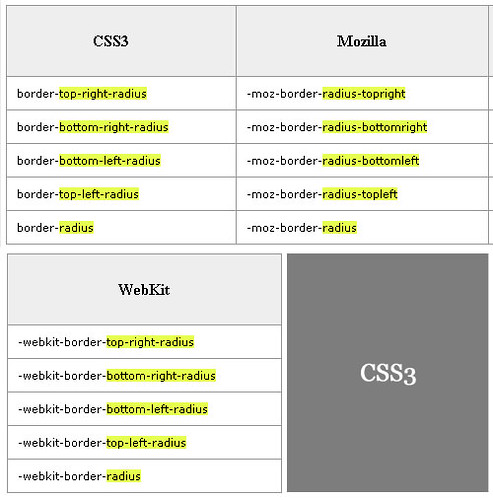
		<description><![CDATA[Berikut code CSS untuk membuat suatu yang rounded corner&#8230; semoga bermanfaat

]]></description>
			<content:encoded><![CDATA[<p>Berikut code CSS untuk membuat suatu yang rounded corner&#8230; semoga bermanfaat</p>
<p><img src="http://farm3.static.flickr.com/2607/3807476238_17ee26a15f.jpg" width="493" height="500" alt="css3" /></p>
]]></content:encoded>
			<wfw:commentRss>http://blog.zulsdesign.com/css-css3/rounded-corner-css3/feed/</wfw:commentRss>
		</item>
		<item>
		<title>Photoshop Plugin for converting PSD to Wordpress Theme</title>
		<link>http://blog.zulsdesign.com/cool-site/photoshop-plugin-for-converting-psd-to-wordpress-theme/</link>
		<comments>http://blog.zulsdesign.com/cool-site/photoshop-plugin-for-converting-psd-to-wordpress-theme/#comments</comments>
		<pubDate>Sat, 08 Aug 2009 08:46:02 +0000</pubDate>
		<dc:creator>zulsdesign</dc:creator>
		
		<category><![CDATA[Cool Site]]></category>

		<category><![CDATA[Free]]></category>

		<category><![CDATA[Services]]></category>

		<category><![CDATA[Web Development]]></category>

		<category><![CDATA[photoshop]]></category>

		<category><![CDATA[plugin]]></category>

		<category><![CDATA[PSD]]></category>

		<category><![CDATA[themes]]></category>

		<category><![CDATA[wordpress]]></category>

		<category><![CDATA[wordpress themes]]></category>

		<guid isPermaLink="false">http://blog.zulsdesign.com/?p=125</guid>
		<description><![CDATA[Divine free Photoshop Plugin for converting PSD to wordpress themes

Why Divine?
Top 10 reasons:

It’s totally free!
You don’t have to pay anything to off-site developers for the markup.
You don’t have to pay for adapting the code to Wordpress CMS™.
Having the Free version, you may get acquainted with the main advantages/benefits of our program.
Creating a Wordpess™ theme in [...]]]></description>
			<content:encoded><![CDATA[<p><strong>Divine</strong> free Photoshop Plugin for converting PSD to wordpress themes</p>
<p><img src="http://farm3.static.flickr.com/2625/3800568564_b159f573c4.jpg" alt="divine" width="500" height="200" /></p>
<p><strong>Why Divine?</strong><br />
Top 10 reasons:</p>
<ol>
<li>It’s totally free!</li>
<p>You don’t have to pay anything to off-site developers for the markup.<br />
You don’t have to pay for adapting the code to Wordpress CMS™.<br />
Having the Free version, you may get acquainted with the main advantages/benefits of our program.</p>
<li>Creating a Wordpess™ theme in just a couple of minutes</li>
<p>You don’t have to order a theme and wait for its realization for long days or even weeks at times.<br />
With the help of Divine you spent less than 5 minutes for theme creation.<br />
Convert your graphics to a ready-made site in just a few clicks.</p>
<li>Minimal knowledge about sites creation</li>
<p>Photoshop basic is pretty enough.<br />
Web-technologies general notions are completely enough.</p>
<li>Popular CMS support</li>
<p>Having the Free version, you can create themes for Wordpress CMS™.<br />
You can create an unlimited number of unique themes.</p>
<li>Questions? Ideas? Suggestions?</li>
<p>Public your ideas or program’s drawbacks.<br />
Support or comment the existing ideas.<br />
Watch ideas realization and assess the quality.</p>
<li>SEO Friendly (work in progress)</li>
<p>The code is optimized for getting the top results in the search engines.<br />
You may customize the title/description/keywords for each site/page.</p>
<li>Optimized for Load Speed</li>
<p>Divine technology makes a logically correct code.<br />
Multiple layers are united into single groups/images on the basis of logical connections.</p>
<li>Table-less Coding</li>
<p>No tables are used for the page markup.<br />
The code is optimized and agreed to modern web-design requirements.</p>
<li>W3C Valid Shorthand and Optimized CSS (work in progress)</li>
<p>The ready-made code is readable to the most.<br />
Web-pages are compatible with all browsers at their most.</p>
<li>Freedom for designer’s creation</li>
<p>Don’t think about the code – just concentrate on your design.<br />
All your ideas will be implemented on the page most approximate to the template in Photoshop.</ol>
<p><strong><a title="Divine Plugin" href="http://www.divine-project.com/download" target="_blank">Download Now!</a></strong></p>
]]></content:encoded>
			<wfw:commentRss>http://blog.zulsdesign.com/cool-site/photoshop-plugin-for-converting-psd-to-wordpress-theme/feed/</wfw:commentRss>
		</item>
		<item>
		<title>MeeCSS Submit Your CSS Website to Multiple CSS Galleries</title>
		<link>http://blog.zulsdesign.com/cool-site/meecss-submit-your-css-website-to-multiple-css-galleries/</link>
		<comments>http://blog.zulsdesign.com/cool-site/meecss-submit-your-css-website-to-multiple-css-galleries/#comments</comments>
		<pubDate>Mon, 27 Jul 2009 10:03:26 +0000</pubDate>
		<dc:creator>zulsdesign</dc:creator>
		
		<category><![CDATA[Cool Site]]></category>

		<category><![CDATA[Free]]></category>

		<category><![CDATA[Services]]></category>

		<category><![CDATA[css gallery]]></category>

		<category><![CDATA[website]]></category>

		<guid isPermaLink="false">http://blog.zulsdesign.com/?p=120</guid>
		<description><![CDATA[MeeCSS.com Adding your website to the CSS Galleries is a great way to publicize your site, these galleries are a the best&#8221;showroom&#8221; for the coolest designs.
Getting your site published on them gives you the possibility to increase your brand visibility and to make it visible to a lot of experts users.

WHAT WE DO
The aim of [...]]]></description>
			<content:encoded><![CDATA[<p><a href="http://www.meecss.com/" target="_blank" title="MeeCSS"><strong>MeeCSS.com</strong></a> Adding your website to the CSS Galleries is a great way to publicize your site, these galleries are a the best&#8221;showroom&#8221; for the coolest designs.<br />
Getting your site published on them gives you the possibility to increase your brand visibility and to make it visible to a lot of experts users.</p>
<p><img src="http://farm3.static.flickr.com/2430/3761652006_4ffa4c7d4a.jpg" width="500" height="200" alt="meecss" /></p>
<p><strong>WHAT WE DO</strong><br />
The aim of meeCSS is to help you submitting to the more important CSS Galleries on the net, making the submission process faster and easier.<br />
Trough our site you&#8217;ll get direct links to the submission pages of our selected galleries.</p>
<p><strong>HOW IT WORKS</strong><br />
The submission process is easy and it takes two steps: first you choose the galleries you want to submit, then insert your site&#8217;s data and press submit:</p>
<p>An insertion helper window containing your data will appear over the submission page. Now you can copy-and-paste or drag-and-drop your information into the appropriate fields. This way your submissions will be easier and faster.</p>
]]></content:encoded>
			<wfw:commentRss>http://blog.zulsdesign.com/cool-site/meecss-submit-your-css-website-to-multiple-css-galleries/feed/</wfw:commentRss>
		</item>
		<item>
		<title>CheckMyColour Website</title>
		<link>http://blog.zulsdesign.com/cool-site/checkmycolour-website/</link>
		<comments>http://blog.zulsdesign.com/cool-site/checkmycolour-website/#comments</comments>
		<pubDate>Sun, 12 Jul 2009 07:37:11 +0000</pubDate>
		<dc:creator>zulsdesign</dc:creator>
		
		<category><![CDATA[Cool Site]]></category>

		<category><![CDATA[Services]]></category>

		<category><![CDATA[design]]></category>

		<category><![CDATA[Free]]></category>

		<guid isPermaLink="false">http://blog.zulsdesign.com/?p=118</guid>
		<description><![CDATA[What is CheckMyColours?
It is a tool for checking foreground and background color combinations of all DOM elements and determining if they provide sufficient contrast when viewed by someone having color deficits.
All the tests are based on the algorithms suggested by the World Wide Web Consortium (W3C).

Visit Website : http://www.checkmycolours.com/
]]></description>
			<content:encoded><![CDATA[<p><strong>What is CheckMyColours?</strong></p>
<p>It is a tool for checking foreground and background color combinations of all DOM elements and determining if they provide sufficient contrast when viewed by someone having color deficits.<br />
All the tests are based on the algorithms suggested by the <strong>World Wide Web Consortium (W3C)</strong>.</p>
<p><img src="http://farm3.static.flickr.com/2654/3712467056_c0c3f6e905.jpg" width="500" height="200" alt="checkmycolour" /></p>
<p>Visit Website : <a href="http://www.checkmycolours.com/" target="_blank" title="CheckMyColour">http://www.checkmycolours.com/</a></p>
]]></content:encoded>
			<wfw:commentRss>http://blog.zulsdesign.com/cool-site/checkmycolour-website/feed/</wfw:commentRss>
		</item>
		<item>
		<title>FreeCustomize.com YM! Online Status Indicator</title>
		<link>http://blog.zulsdesign.com/cool-site/freecustomizecom-ym-online-status-indicator/</link>
		<comments>http://blog.zulsdesign.com/cool-site/freecustomizecom-ym-online-status-indicator/#comments</comments>
		<pubDate>Tue, 23 Jun 2009 03:59:36 +0000</pubDate>
		<dc:creator>zulsdesign</dc:creator>
		
		<category><![CDATA[Cool Site]]></category>

		<category><![CDATA[Free]]></category>

		<category><![CDATA[Services]]></category>

		<category><![CDATA[offline status]]></category>

		<category><![CDATA[online status]]></category>

		<category><![CDATA[online status indicator]]></category>

		<category><![CDATA[YM! Status]]></category>

		<guid isPermaLink="false">http://blog.zulsdesign.com/?p=114</guid>
		<description><![CDATA[Online Status Indicator is a free service that lets you put on your site a very cute emoticon or combined with your avatar image to show your Yahoo! Messenger status (online or offline).

FreeCustomize.com merupakan layanan gratis bagi Anda yang ingin merubah YM! status indicator di blog atau di website. yang biasanya hanya gambar itu-itu saja, [...]]]></description>
			<content:encoded><![CDATA[<p>Online Status Indicator is a free service that lets you put on your site a very cute emoticon or combined with your avatar image to show your Yahoo! Messenger status (online or offline).</p>
<p><img src="http://farm3.static.flickr.com/2444/3652226229_30c8451cc5.jpg" width="500" height="200" alt="freecustomize1" /></p>
<p><a href="http://www.freecustomize.com" target="_blank" title="FreeCustomize.com">FreeCustomize.com</a> merupakan layanan gratis bagi Anda yang ingin merubah YM! status indicator di blog atau di website. yang biasanya hanya gambar itu-itu saja, kini Anda bisa memilih gambar-gambar yang disediakan oleh <a href="http://www.freecustomize.com" target="_blank" title="FreeCustomize.com">FreeCustomize.com</a>. Ada 25 gambar-gambar lucu dan gambarnya bergerak-gerak, pokoknya dijamin akan suka deh <img src='http://blog.zulsdesign.com/wp-includes/images/smilies/icon_smile.gif' alt=':)' class='wp-smiley' /> </p>
<p><img src="http://farm4.static.flickr.com/3405/3652226237_e8ba6c7b0e.jpg" width="500" height="200" alt="freecustomize2" /></p>
<p>Layanan di atas disediakan oleh <a href="http://www.zulsdesign.com/" target="_blank" title="zulsdesign studio">zulsdesign studio group</a></p>
<p>Website : <a href="http://www.freecustomize.com" target="_blank" title="FreeCustomize.com"><strong>FreeCustomize.com</strong></a></p>
<p><strong>Tutorial Cara Pasang di Blog/Web (terima kasih buat teman-teman yang mereview website ini <img src='http://blog.zulsdesign.com/wp-includes/images/smilies/icon_smile.gif' alt=':)' class='wp-smiley' /> ) : </strong><br />
<a href="http://apocalytyo.blogspot.com/2009/04/cara-gaul-menampilkan-status-ym-pada.html" target="_blank" title="Freecustomize.com"><strong>Cara gaul menampilkan status YM pada blog</strong></a><br />
<a href="http://www.ailyaily.co.cc/2009/06/ym-status-indicator.html" target="_blank" title="Freecustomize.com"><strong>YM! status indicator di facebook</strong></a><br />
<a href="http://tetehsarah.com/memasukkan-icon-ym-ke-blog" target="_blank" title="Freecustomize.com"><strong>Memasukkan icon YM ke blog</strong></a></p>
]]></content:encoded>
			<wfw:commentRss>http://blog.zulsdesign.com/cool-site/freecustomizecom-ym-online-status-indicator/feed/</wfw:commentRss>
		</item>
		<item>
		<title>Concept Feedback</title>
		<link>http://blog.zulsdesign.com/cool-site/concept-feedback/</link>
		<comments>http://blog.zulsdesign.com/cool-site/concept-feedback/#comments</comments>
		<pubDate>Wed, 17 Jun 2009 03:06:13 +0000</pubDate>
		<dc:creator>zulsdesign</dc:creator>
		
		<category><![CDATA[Cool Site]]></category>

		<category><![CDATA[Free]]></category>

		<category><![CDATA[design]]></category>

		<category><![CDATA[concept review]]></category>

		<category><![CDATA[designer]]></category>

		<category><![CDATA[feedback]]></category>

		<category><![CDATA[marketer]]></category>

		<category><![CDATA[web developer]]></category>

		<guid isPermaLink="false">http://blog.zulsdesign.com/?p=111</guid>
		<description><![CDATA[What is CF about?
Designed specifically for marketers, graphic designers, and web developers, Concept Feedback provides a simple tool to get free quality feedback.

Website : http://www.conceptfeedback.com/
Concept feedback bisa anda manfaatkan untuk posting konsep design anda, nantinya akan mendapatkan respon tentang hasil yang anda post, ini sangat bagus karena kita bisa mendapatkan masukan yang membangun, positif  [...]]]></description>
			<content:encoded><![CDATA[<p><strong>What is CF about?</strong><br />
Designed specifically for marketers, graphic designers, and web developers, Concept Feedback provides a simple tool to get free quality feedback.</p>
<p><img src="http://farm4.static.flickr.com/3063/3631129139_546d059fe8.jpg" width="500" height="200" alt="conceptfeedback" /></p>
<p><strong>Website : http://www.conceptfeedback.com/</strong></p>
<p>Concept feedback bisa anda manfaatkan untuk posting konsep design anda, nantinya akan mendapatkan respon tentang hasil yang anda post, ini sangat bagus karena kita bisa mendapatkan masukan yang membangun, positif <img src='http://blog.zulsdesign.com/wp-includes/images/smilies/icon_smile.gif' alt=':)' class='wp-smiley' /> </p>
]]></content:encoded>
			<wfw:commentRss>http://blog.zulsdesign.com/cool-site/concept-feedback/feed/</wfw:commentRss>
		</item>
		<item>
		<title>Helpful Firebug Tools for Web Development</title>
		<link>http://blog.zulsdesign.com/web-development/helpful-firebug-tools-for-web-development/</link>
		<comments>http://blog.zulsdesign.com/web-development/helpful-firebug-tools-for-web-development/#comments</comments>
		<pubDate>Sat, 13 Jun 2009 04:29:53 +0000</pubDate>
		<dc:creator>zulsdesign</dc:creator>
		
		<category><![CDATA[Mozilla Addons]]></category>

		<category><![CDATA[Web Development]]></category>

		<category><![CDATA[addons]]></category>

		<category><![CDATA[Firebug]]></category>

		<category><![CDATA[firefox]]></category>

		<category><![CDATA[helpful tools]]></category>

		<category><![CDATA[mozilla]]></category>

		<guid isPermaLink="false">http://blog.zulsdesign.com/?p=107</guid>
		<description><![CDATA[Firebug integrates with Firefox to put a wealth of web development tools at your fingertips while you browse. You can edit, debug, and monitor CSS, HTML, and JavaScript live in any web page.

Kalau Anda belum kenal dengan tools yang satu ini berarti Anda ketinggalan  kenapa saya bilang begitu? ya karena tools ini adalah tools [...]]]></description>
			<content:encoded><![CDATA[<p>Firebug integrates with Firefox to put a wealth of web development tools at your fingertips while you browse. You can edit, debug, and monitor CSS, HTML, and JavaScript live in any web page.</p>
<p><img src="http://farm3.static.flickr.com/2475/3620607683_66ff69f5e8.jpg" width="500" height="200" alt="Helpful Firebug Tools for Web Development" /></p>
<p>Kalau Anda belum kenal dengan tools yang satu ini berarti Anda ketinggalan <img src='http://blog.zulsdesign.com/wp-includes/images/smilies/icon_biggrin.gif' alt=':D' class='wp-smiley' /> kenapa saya bilang begitu? ya karena tools ini adalah tools yang paling populer dikalangan web developer dunia.</p>
<p><strong>Berikut fitur yang disediakan oleh firebug :</strong><br />
<strong>Inspect and edit HTML</strong><br />
Firebug sangat mudah dalam mencari elemen dari HTML sesuai dengan urutan code HTML yang anda buat, Anda dapat mengedit dan melihat langsung perubahannya.</p>
<p><strong>Tweak CSS to perfection</strong><br />
Sama halnya dengan Inspect and edit HTML, untuk CSS disediakan tab disebelah kanan untuk melihat CSS, Anda juga bisa mengedit CSS dan melihat perubahannya langsung.</p>
<p><strong>Quickly find errors</strong><br />
Firebug dengan mudah menemukan kesalahan dalam coding Javascript, CSS dan XML dan menunjukkannya pada Anda dengan detail.</p>
<p>Sebenarnya masih banyak lagi fitur yang disediakan oleh tool Firebug ini. kalo saya pribadi sebagai seorang web designer tool ini wajib saya gunakan, lebih memudahkan dalam mendeteksi kesalahan dalam coding dan tampilan, saya tinggal merubahnya menggunakan tool firebug ini.</p>
<p>Website : <a href="http://getfirebug.com/" target="_blank" title="Firebug for Firefox"><strong>http://getfirebug.com/</strong></a><br />
<a href="https://addons.mozilla.org/en-US/firefox/downloads/file/47650/firebug-1.3.3-fx.xpi" target="_blank" title="Install Firebug for Firefox"><strong>Install Firebug 1.3 for Firefox</strong></a> or Need to support IE, Opera, or Safari? <a href="http://getfirebug.com/lite.html" target="_blank" title="Install Firebug for IE, Opera, or Safari"><strong>Get Firebug Lite</strong></a></p>
]]></content:encoded>
			<wfw:commentRss>http://blog.zulsdesign.com/web-development/helpful-firebug-tools-for-web-development/feed/</wfw:commentRss>
		</item>
		<item>
		<title>Learning JQuery Tips, techniques, and tutorials</title>
		<link>http://blog.zulsdesign.com/cool-site/learning-jquery-tips-techniques-and-tutorials/</link>
		<comments>http://blog.zulsdesign.com/cool-site/learning-jquery-tips-techniques-and-tutorials/#comments</comments>
		<pubDate>Fri, 12 Jun 2009 11:08:13 +0000</pubDate>
		<dc:creator>zulsdesign</dc:creator>
		
		<category><![CDATA[Cool Site]]></category>

		<category><![CDATA[JQuery]]></category>

		<category><![CDATA[Java Script]]></category>

		<category><![CDATA[techniques]]></category>

		<category><![CDATA[Tips]]></category>

		<category><![CDATA[tutorials]]></category>

		<guid isPermaLink="false">http://blog.zulsdesign.com/?p=104</guid>
		<description><![CDATA[Learning jQuery is a multi-author weblog providing jQuery tutorials, demos, and announcements. We have tutorials for all skill levels, and each entry is categorized by level of difficulty.

Bagi teman-teman yang gemar menggunakan JQuery untuk memperindah tampilan blognya, atau untuk kebutuhan develop ini dia website bagus untuk menimba ilmu dari sana  
Website : http://www.learningjquery.com/
]]></description>
			<content:encoded><![CDATA[<p>Learning jQuery is a multi-author weblog providing jQuery tutorials, demos, and announcements. We have tutorials for all skill levels, and each entry is categorized by level of difficulty.</p>
<p><img src="http://farm4.static.flickr.com/3601/3619274608_18212183e0.jpg" alt="learningjquery" width="500" height="200" /></p>
<p>Bagi teman-teman yang gemar menggunakan JQuery untuk memperindah tampilan blognya, atau untuk kebutuhan develop ini dia website bagus untuk menimba ilmu dari sana <img src='http://blog.zulsdesign.com/wp-includes/images/smilies/icon_smile.gif' alt=':)' class='wp-smiley' /> </p>
<p><strong>Website : <a title="Learning JQuery" href="http://www.learningjquery.com/" target="_blank">http://www.learningjquery.com/</a></strong></p>
]]></content:encoded>
			<wfw:commentRss>http://blog.zulsdesign.com/cool-site/learning-jquery-tips-techniques-and-tutorials/feed/</wfw:commentRss>
		</item>
		<item>
		<title>Clixpy Tracks Everything</title>
		<link>http://blog.zulsdesign.com/services/clixpy-tracks-everything/</link>
		<comments>http://blog.zulsdesign.com/services/clixpy-tracks-everything/#comments</comments>
		<pubDate>Tue, 09 Jun 2009 07:31:04 +0000</pubDate>
		<dc:creator>zulsdesign</dc:creator>
		
		<category><![CDATA[Services]]></category>

		<category><![CDATA[monitoring]]></category>

		<category><![CDATA[usability]]></category>

		<category><![CDATA[website]]></category>

		<guid isPermaLink="false">http://blog.zulsdesign.com/?p=102</guid>
		<description><![CDATA[What is Clixpy and how it works ?
Clixpy is a web usability testing tool. It’s very easy to install, just by pasting a few lines of JavaScript code in your site’s HTML. When users browse your website Clixpy traces everything they do and then plays it for you, giving you the opportunity to extract any [...]]]></description>
			<content:encoded><![CDATA[<p><strong>What is Clixpy and how it works ?</strong><br />
Clixpy is a web usability testing tool. It’s very easy to install, just by pasting a few lines of JavaScript code in your site’s HTML. When users browse your website Clixpy traces everything they do and then plays it for you, giving you the opportunity to extract any information you may need.</p>
<p><img src="http://farm3.static.flickr.com/2455/3610275838_b67e8a652e.jpg" width="500" height="200" alt="Clixpy" /></p>
<p><strong>Why should I use Clixpy on my website ?</strong><br />
Clixpy helps you find out which features are difficult to use and which are easy, where your users spend more time and why they leave your website. Clixpy can help you optimize landing pages and convert more visitors to clients.</p>
<p>Website : <strong>http://clixpy.com/</strong></p>
]]></content:encoded>
			<wfw:commentRss>http://blog.zulsdesign.com/services/clixpy-tracks-everything/feed/</wfw:commentRss>
		</item>
		<item>
		<title>Going to Jakarta</title>
		<link>http://blog.zulsdesign.com/personal/going-to-jakarta/</link>
		<comments>http://blog.zulsdesign.com/personal/going-to-jakarta/#comments</comments>
		<pubDate>Mon, 08 Jun 2009 10:38:02 +0000</pubDate>
		<dc:creator>zulsdesign</dc:creator>
		
		<category><![CDATA[Personal]]></category>

		<category><![CDATA[ASP.NET]]></category>

		<category><![CDATA[Expression Studio]]></category>

		<category><![CDATA[Jakarta]]></category>

		<category><![CDATA[Microsoft]]></category>

		<category><![CDATA[Silverlight]]></category>

		<category><![CDATA[Training]]></category>

		<guid isPermaLink="false">http://blog.zulsdesign.com/?p=98</guid>
		<description><![CDATA[Hari rabu kemaren tiba dijakarta dengan kondisi badan yang kurang fit.. mungkin kecapean dikereta.. karena gak biasa pergi jauh menempuh waktu 12 jam dari Surabaya ke Jakarta. Tujuan keJakarta adalah mengikuti Training yang diadakan oleh Bina ISV mengenalkan product-product terbaru dari Microsoft, Microsoft Expression Studio dan Microsoft Visual Studio 2008.


Hari pertama training kayaknya kurang maksimal, [...]]]></description>
			<content:encoded><![CDATA[<p>Hari rabu kemaren tiba dijakarta dengan kondisi badan yang kurang fit.. mungkin kecapean dikereta.. karena gak biasa pergi jauh menempuh waktu 12 jam dari Surabaya ke Jakarta. Tujuan keJakarta adalah mengikuti Training yang diadakan oleh Bina ISV mengenalkan product-product terbaru dari Microsoft, Microsoft Expression Studio dan Microsoft Visual Studio 2008.</p>
<p><img src="http://farm4.static.flickr.com/3618/3607155184_d16db01eed.jpg" alt="zulinmonas" width="374" height="500" /></p>
<p><span id="more-98"></span><br />
Hari pertama training kayaknya kurang maksimal, karena badan kurang vit, mual&#8230; bahasan di Training adalah Pengenalan Expression Studio.. Microsoft adalah pemain baru dalam software ini.. kurang dari 2 tahun.. dan sudah mengeluarkan versi 3. sebenarnya tidak ada yang special dari software tsb.. tapi lumayan membuat saya tertarik dalam proses slicing&#8230; langkahnya lebih cepat dibanding dengan slicing pake Photoshop <img src='http://blog.zulsdesign.com/wp-includes/images/smilies/icon_smile.gif' alt=':)' class='wp-smiley' /> siangnya aku izin untuk tidak ikut training dan memutuskan untuk pulang dan istirahat di kosan teman di daerah sudirman.</p>
<p>Hari kedua Training membahas SilverLight.. masih di expression studio buatan microsoft.. Silverlight mirip dengan Flashnya Adobe.. yang membedakan adalah&#8230; kalo flash berbasis object sedangkan silverlight berbasis code&#8230; object-objectnya terbentuk oleh kumpulan code-code..</p>
<p>Hari Terakhir Training adalah membahas ASP.NET hehehe&#8230; inipun cuma dasar.. karena yang ikut training sebagian besar adalah pemula yang belum sama sekali mengerti tentang ASP.NET termasuk diriku meskipun pernah ngutak atik ASP.NET tapi kemampuannya jauh dibawah hehehe&#8230;.</p>
<p><img src="http://farm3.static.flickr.com/2480/3607171130_663959cc7a.jpg" width="500" height="375" alt="zulinbusway" /><br />
<em>*dijembatan BusWay</em></p>
<p><img src="http://farm4.static.flickr.com/3389/3606351005_67018af051.jpg" width="374" height="500" alt="zulintranstv" /><br />
<em>*Gedung trans Tv</em></p>
<p>Mungkin itu aja kegiatan yang kulakukan beberapa hari di jakarta&#8230; sebenarnya banyak sih kegiatannya.. tapi kayaknya gak perlu diposting deh <img src='http://blog.zulsdesign.com/wp-includes/images/smilies/icon_razz.gif' alt=':P' class='wp-smiley' /> </p>
]]></content:encoded>
			<wfw:commentRss>http://blog.zulsdesign.com/personal/going-to-jakarta/feed/</wfw:commentRss>
		</item>
	</channel>
</rss>
